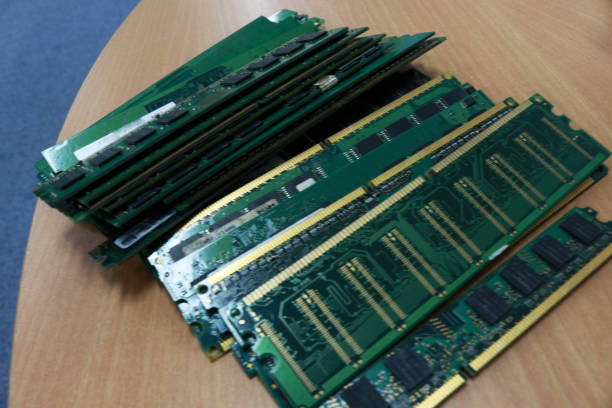
Small business servers require efficient memory resources to manage applications, data processing, and daily operational workloads. As organizations grow, existing server memory may become insufficient to support increasing demands. Choosing the right hp microserver ram upgrade helps businesses improve server responsiveness, maintain reliable performance, and extend the usability of their existing hardware.
RAM expansion is not simply about increasing memory capacity. It involves selecting compatible modules, understanding workload requirements, and planning future scalability. A properly configured memory upgrade allows HP MicroServer systems to operate more efficiently while supporting changing business requirements.
Why Is HP MicroServer RAM Expansion Important for Small Businesses?
Memory is a critical component that influences server speed, application performance, and overall system efficiency. HP MicroServer systems depend on sufficient RAM resources to handle business applications, storage management, and multiple processes.
A well-planned memory expansion improves resource availability and helps prevent performance limitations caused by insufficient memory capacity.
Improving Server Performance for Growing Workloads
As workloads increase, servers require additional resources to maintain smooth performance. Limited memory availability can affect application responsiveness and reduce operational efficiency.
Increasing RAM capacity allows HP MicroServer systems to manage more processes effectively and improves overall server performance.
Supporting Business Applications and Data Management Needs
Business applications require adequate memory resources to function efficiently. A suitable RAM configuration helps servers process data faster and supports reliable application performance.
Proper memory planning ensures that business operations continue running smoothly as requirements increase.
Understanding HP MicroServer Memory Requirements
Before upgrading memory, businesses should understand the specific requirements of their HP MicroServer model. Each server supports certain memory types, capacities, and configurations.
Reviewing these specifications helps administrators select suitable modules and avoid compatibility issues.
How RAM Impacts Small Business Server Performance
RAM directly affects how quickly a server can access and process information. When sufficient memory is available, applications can operate with better responsiveness.
Insufficient memory can create bottlenecks and reduce the efficiency of server operations.
Evaluating Current and Future Memory Needs
Memory requirements should be evaluated based on current workloads and future expansion plans. Businesses should analyze existing resource usage before selecting additional RAM.
A scalable memory strategy helps support future growth without unnecessary infrastructure changes.
What Should Businesses Consider Before an HP MicroServer Memory Upgrade?
A successful RAM upgrade requires proper planning and evaluation. Businesses should consider server workload demands, compatibility requirements, and long-term infrastructure goals.
This ensures that the selected memory upgrade provides meaningful performance improvements.
Assessing Server Workloads and Performance Bottlenecks
Understanding workload requirements helps identify whether memory limitations are affecting performance. Reviewing system usage allows administrators to determine the right upgrade approach.
Memory should be selected according to actual requirements rather than only increasing capacity.
Determining the Right RAM Capacity for Business Needs
The correct RAM capacity depends on applications, user requirements, and server responsibilities. Selecting suitable memory ensures efficient resource utilization.
A balanced configuration provides enough capacity while maintaining cost efficiency.
Planning for Future Scalability
Future scalability should be considered during memory upgrades. Selecting expandable memory configurations allows businesses to support increasing workloads over time.
Long-term planning helps maximize the value of existing server hardware.
Why Is ECC RAM Important for HP MicroServer Servers?
ECC RAM improves server reliability by detecting and correcting certain memory errors. Server environments require stable memory performance because data accuracy and availability are important.
Choosing reliable memory technology supports consistent and dependable operations.
Understanding Error Correction Technology
Error correction technology helps identify specific memory issues and improves data reliability. ECC memory is designed to support environments where stability is essential.
This technology helps maintain accurate data processing and system performance.
Improving Data Reliability and Server Stability
Reliable memory reduces the risk of performance issues caused by memory errors. ECC RAM supports stable server operations and improves infrastructure reliability.
A dependable memory configuration helps businesses maintain consistent performance.
Supporting Always-On Business Operations
Small business servers often support important applications and data management tasks. Reliable memory solutions help maintain continuous performance.
Selecting suitable ECC RAM contributes to a stable server environment.
How to Choose Compatible DIMMs for HP MicroServer RAM Expansion?
Selecting compatible DIMMs is one of the most important steps during a memory upgrade. Unsupported modules can create performance issues or prevent proper server operation.
Administrators should verify memory specifications before installation.
Checking Memory Specifications and Server Compatibility
Businesses should review supported memory types, capacities, and technical specifications before purchasing RAM.
Compatibility verification ensures that selected modules work correctly with existing server hardware.
Understanding DIMM Capacity, Speed, and Type
DIMM capacity determines available memory resources, while speed affects data transfer efficiency. Memory type and architecture influence compatibility and performance.
Selecting the correct combination helps maintain server stability.
Avoiding Unsupported Memory Configurations
Unsupported memory combinations can lead to reduced performance and system limitations. Following recommended configurations helps prevent installation problems.
What Are the Benefits of Upgrading Small Business Server Memory?
A memory upgrade provides additional resources that improve server capabilities. Increasing RAM capacity allows systems to handle workloads more efficiently.
Improving Application Performance and Responsiveness
Additional memory allows applications to access resources faster and improves system responsiveness.
Supporting Virtualization and Multiple Users
Virtualization environments require sufficient memory resources to support multiple workloads. Additional RAM improves workload management and performance.
Extending the Useful Life of Existing Server Hardware
Memory expansion can improve the performance of existing server systems and delay the need for complete hardware replacement.
What Common Mistakes Should Businesses Avoid During HP MicroServer RAM Upgrades?
Proper planning helps businesses avoid common mistakes during memory installation. Incorrect decisions can reduce the benefits of an upgrade.
Selecting RAM Based Only on Price
Choosing memory only based on price can result in compatibility concerns. Technical specifications and reliability should always be considered.
Installing Incompatible Memory Modules
Using unsupported modules can affect server stability and performance. Compatibility checks should be completed before installation.
Upgrading Without Reviewing Workload Requirements
Adding memory without evaluating workload requirements may not deliver expected improvements.
How Can IT Administrators Plan a Successful HP MicroServer Memory Upgrade?
A structured upgrade process ensures better results and reduces potential issues.
Checking Existing Memory Configuration
Administrators should review current memory installation, available slots, and existing capacity before upgrading.
Verifying Compatibility Before Installation
Compatibility verification ensures that selected modules meet server requirements.
Testing Server Stability After Upgrade
Testing confirms that the upgraded configuration operates correctly and maintains reliable performance.
How Does the Right RAM Upgrade Support Small Business Growth?
The right memory configuration helps businesses prepare their infrastructure for increasing demands.
Preparing Infrastructure for Increasing Data Demands
Additional memory resources help servers manage growing data requirements more efficiently.
Reducing the Need for Premature Hardware Replacement
A suitable RAM upgrade improves existing server capabilities and extends hardware usability.
Improving Long-Term IT Investment Value
Strategic memory planning allows businesses to maximize their infrastructure investment.
Why Choose RAM Exchange for HP MicroServer RAM Solutions?
Choosing a reliable memory provider helps businesses achieve better compatibility and performance. Quality memory solutions support stable server operations and efficient workload management.
Compatible HP MicroServer Memory Upgrade Options
Compatible memory modules help maintain reliable performance and reduce configuration concerns.
Quality-Tested ECC RAM and Enterprise Memory Solutions
Quality-tested memory solutions provide dependable performance for business server environments.
Organizations looking for reliable enterprise memory technologies can consider hpe smart memory solutions to support better compatibility and server efficiency.
Expert Support for Small Business Server Expansion
Professional support helps businesses select suitable memory upgrades based on server specifications and workload requirements.
Conclusion
HP MicroServer RAM expansion is an effective way to improve small business server performance and support future growth. Selecting compatible memory, planning capacity requirements, and following proper installation methods help maintain reliable infrastructure.
A well-planned memory upgrade improves efficiency, extends hardware usability, and provides better support for changing business needs.
Frequently Asked Questions
How Much RAM Can an HP MicroServer Support?
The maximum supported RAM depends on the specific HP MicroServer model and its hardware specifications. Businesses should verify supported capacity before upgrading.
Is ECC RAM Required for HP MicroServer Servers?
ECC RAM is recommended for server environments because it improves memory reliability and helps maintain stable operations.
How Do I Check HP MicroServer RAM Compatibility?
Compatibility can be checked by reviewing server specifications, supported DIMM types, memory limits, and module requirements.
What Are the Benefits of Upgrading HP MicroServer Memory?
A RAM upgrade improves application performance, supports additional workloads, and enhances overall server responsiveness.
Can a RAM Upgrade Improve Small Business Server Performance?
Yes, a compatible memory upgrade can improve server efficiency by providing additional resources for applications and workloads.