
Lenovo Server Memory Upgrade Guide for Enterprises
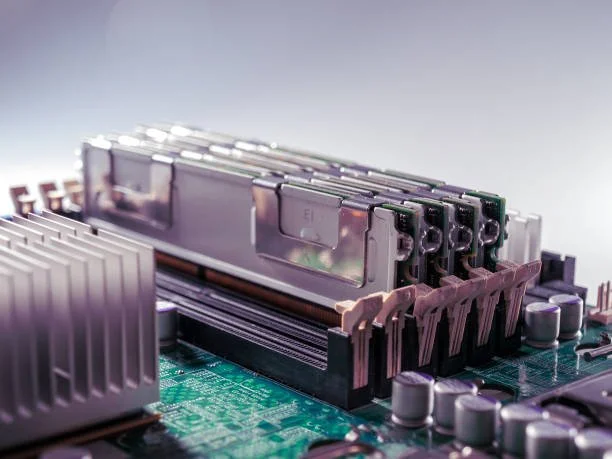
Enterprise IT environments continue to face growing demands from modern applications, virtualization platforms, cloud services, and data-intensive workloads. As organizations expand their digital infrastructure, server resources must keep pace with increasing performance requirements. One of the most effective ways to improve server capability without replacing existing hardware is through a memory upgrade.
Memory plays a critical role in determining how efficiently a server processes workloads and supports concurrent operations. Upgrading Lenovo server memory can help enterprises improve system responsiveness, increase workload capacity, and extend the lifespan of their server infrastructure. Understanding the planning, compatibility, and implementation process is essential for achieving the best possible results from a memory upgrade investment.
Why Lenovo Server Memory Upgrades Are Important for Enterprise Performance
As enterprise environments evolve, server memory becomes increasingly important for maintaining application performance and infrastructure efficiency. Memory limitations can create bottlenecks that affect overall business operations and reduce productivity.
A well-planned memory upgrade helps organizations support changing workload demands while maximizing the value of their existing server investments.
Addressing Growing Workload Demands
Modern business applications require significantly more memory than previous generations of software. Databases, virtualization platforms, cloud-based services, and analytics applications all consume large amounts of system memory during operation.
As organizations deploy additional services and increase data processing requirements, memory resources can become constrained. Upgrading server memory allows systems to accommodate higher workloads while maintaining consistent performance levels. This approach helps enterprises adapt to changing business needs without undertaking costly infrastructure replacements.
Improving Server Efficiency and Resource Utilization
When sufficient memory is available, servers can process data more efficiently and reduce reliance on slower storage systems. Memory shortages often force systems to use disk-based operations to compensate for limited capacity, which can increase latency and reduce responsiveness.
Additional memory allows applications, databases, and virtual machines to operate more effectively. Improved resource utilization helps organizations maximize server performance while supporting a greater number of simultaneous workloads.
Understanding Lenovo Server Memory Requirements
Before purchasing new memory modules, organizations must understand the technical requirements of their Lenovo servers. Compatibility plays a critical role in ensuring successful deployment and optimal performance.
Careful evaluation of supported memory specifications helps prevent installation issues and ensures the upgraded system performs as expected.
Types of Memory Supported by Lenovo Servers
Lenovo enterprise servers support a variety of memory technologies depending on the server generation and processor architecture. Common options include DDR4 Registered DIMMs, Load Reduced DIMMs, DDR5 memory modules, and Error Correcting Code memory.
ECC memory is particularly important in enterprise environments because it helps identify and correct memory errors before they affect application performance or data integrity. Different server models support different memory types, making compatibility verification an essential part of the upgrade process.
Capacity, Speed, and Compatibility Considerations
Selecting memory involves more than simply increasing capacity. Organizations must also evaluate speed, processor support, motherboard limitations, and slot population requirements.
Memory modules should be selected based on the server's supported specifications to ensure reliable operation. Installing unsupported configurations can reduce performance or prevent the system from recognizing the installed memory correctly. Reviewing compatibility documentation before purchasing helps avoid these issues and simplifies deployment.
Signs Your Infrastructure Needs a Lenovo Server RAM Upgrade
Memory shortages often develop gradually as workloads increase over time. Recognizing the warning signs early can help organizations address performance issues before they affect business operations.
Monitoring infrastructure performance provides valuable insight into whether memory resources have become a limiting factor.
Performance Bottlenecks and Slow Application Response Times
One of the most common indicators of insufficient memory is declining application performance. Systems may experience slower response times, increased latency, and reduced overall responsiveness when available memory becomes limited.
Applications that previously operated efficiently may begin requiring more time to process requests. Database performance can also suffer as memory shortages force increased reliance on storage resources. These symptoms often indicate that additional memory capacity is needed.
Increasing Virtualization and Data Processing Requirements
Virtualization environments place substantial demands on server memory because each virtual machine requires dedicated resources. As organizations deploy additional virtual machines, memory utilization can increase rapidly.
Similarly, data processing workloads, reporting platforms, and analytics applications consume significant memory resources. As these workloads expand, upgrading memory becomes necessary to maintain performance and operational efficiency.
At Ram Exchange, organizations can find enterprise-grade memory solutions designed to support Lenovo servers and other data center platforms. Access to tested and validated memory helps simplify upgrades while improving deployment confidence.
Benefits of Upgrading Lenovo Server Memory
A memory upgrade can deliver substantial benefits across multiple areas of enterprise IT operations. Increased memory capacity improves performance while creating opportunities for future growth.
Organizations that proactively upgrade memory often achieve better infrastructure utilization and greater operational efficiency.
Enhanced System Performance and Multitasking Capabilities
Additional memory allows servers to handle larger workloads while maintaining consistent performance. Applications can access required data more efficiently, reducing delays and improving overall responsiveness.
Servers with sufficient memory are better equipped to manage multiple workloads simultaneously. This improved multitasking capability supports higher productivity and helps maintain service quality as demand increases.
Improved Scalability for Future Business Growth
Memory upgrades provide a scalable approach to infrastructure expansion. Rather than replacing existing hardware, organizations can increase capacity by installing additional memory modules that support future workload growth.
This strategy helps extend the useful lifespan of server investments while reducing the costs associated with large-scale hardware replacement projects. Scalable memory configurations also simplify future upgrades as business requirements continue to evolve.
How to Choose the Right Lenovo Server Memory Configuration
Selecting the appropriate memory configuration requires balancing technical requirements, business objectives, and budget considerations. A structured planning process helps ensure the chosen configuration delivers long-term value.
Organizations should evaluate both current needs and anticipated future requirements when developing a memory upgrade strategy.
Evaluating Current and Future Workload Requirements
Memory planning begins with understanding how servers are currently being utilized. Reviewing workload trends, virtualization growth, database expansion, and application demands provides valuable insight into future memory requirements.
Organizations should also consider expected business growth and infrastructure expansion plans. Planning for future requirements reduces the likelihood of needing additional upgrades in the near term and helps maximize return on investment.
Balancing Capacity, Performance, and Budget
While higher-capacity configurations offer greater flexibility, budget considerations remain an important factor. The ideal memory configuration balances performance goals with financial constraints.
Organizations should focus on configurations that provide sufficient capacity for current operations while leaving room for future expansion. This approach supports scalability without creating unnecessary upfront costs.
Step-by-Step Lenovo Server RAM Upgrade Planning
Successful memory upgrades require careful planning and preparation. A structured approach helps minimize deployment risks and ensures compatibility throughout the upgrade process.
Thorough planning also reduces downtime and simplifies implementation activities.
Auditing Existing Memory Configurations
Before purchasing new memory, administrators should review the existing server configuration. This includes identifying installed memory types, capacities, speeds, and slot utilization.
Understanding the current environment helps determine the most effective upgrade path. It also allows organizations to identify potential compatibility issues before new modules are purchased and installed.
Identifying Compatible Upgrade Options
Once the existing configuration has been documented, organizations can evaluate available upgrade options. Compatibility should be verified against Lenovo documentation and supported hardware specifications.
Many enterprise environments also evaluate solutions such as cisco ram memory when managing mixed-vendor infrastructures. Regardless of platform, selecting validated memory modules helps ensure reliable operation and consistent performance.
Common Enterprise Workloads That Benefit From Memory Upgrades
Not all workloads place equal demands on server memory. Certain applications and infrastructure components benefit significantly from expanded memory capacity.
Understanding workload requirements helps organizations prioritize upgrades where they will deliver the greatest impact.
Virtualization, Cloud Computing, and Databases
Virtualization environments are among the most memory-intensive workloads found in enterprise data centers. Each virtual machine consumes memory resources, making capacity planning critical for maintaining performance.
Cloud computing platforms and database systems also benefit from additional memory because they frequently cache large amounts of data and process numerous transactions simultaneously. Increased memory capacity supports greater efficiency and improved responsiveness.
Analytics, AI Applications, and Business-Critical Systems
Analytics platforms, artificial intelligence applications, and business-critical software often process large datasets that require substantial memory resources. These workloads benefit from expanded memory capacity because it enables faster data access and more efficient processing.
As organizations continue adopting advanced technologies, memory requirements are expected to grow further. Strategic upgrades help ensure infrastructure remains capable of supporting future innovation initiatives.
Best Practices for Installing and Validating New Memory
Installation and validation are critical components of any successful memory upgrade project. Proper procedures help ensure that new memory operates correctly and delivers expected performance improvements.
Organizations should follow manufacturer recommendations throughout the installation process.
Following Lenovo Memory Population Guidelines
Lenovo servers include specific guidelines regarding memory slot population and channel configuration. Following these recommendations helps maximize memory bandwidth and maintain system stability.
Improper slot population can reduce performance and, in some cases, prevent the server from recognizing installed memory. Careful adherence to documented procedures helps avoid these issues.
Testing Performance and Stability After Installation
Following installation, administrators should verify that the system recognizes the new memory correctly. Validation should include capacity checks, performance monitoring, and diagnostic testing.
Testing helps identify potential issues before production workloads are affected. It also confirms that the upgrade delivers the anticipated performance improvements and operates reliably under normal conditions.
Common Mistakes to Avoid During a Lenovo Server RAM Upgrade
Even well-planned upgrades can encounter problems if key considerations are overlooked. Understanding common mistakes helps organizations avoid unnecessary complications.
Attention to detail during planning and deployment contributes significantly to upgrade success.
Mixing Incompatible Memory Modules
Combining different memory technologies, speeds, or specifications can create compatibility issues that affect performance and stability. Mixed configurations may force the system to operate below optimal performance levels.
Using validated and compatible memory modules helps ensure reliable operation and simplifies future expansion efforts.
Overlooking Future Expansion Requirements
Some organizations focus solely on immediate memory needs without considering future growth. This approach can limit scalability and increase long-term upgrade costs.
A forward-looking memory strategy helps preserve expansion flexibility while supporting evolving business requirements.
How RAM Exchange Supports Lenovo Server Memory Upgrades
Selecting a reliable supplier is an important part of any memory upgrade project. Organizations benefit from working with providers that understand enterprise hardware requirements and compatibility considerations.
Access to quality products and technical expertise can simplify deployment while reducing operational risk.
Enterprise-Grade Memory Solutions for Lenovo Servers
RAM Exchange offers memory solutions designed for enterprise server environments, including Lenovo platforms. Their inventory supports a wide range of capacity and performance requirements, helping organizations identify appropriate upgrade options.
Tested memory solutions help improve deployment confidence while supporting long-term reliability objectives.
Expert Guidance for Compatibility and Capacity Planning
Choosing the right memory configuration often involves evaluating complex compatibility requirements and future workload expectations. RAM Exchange provides guidance that helps organizations make informed decisions regarding memory selection and upgrade planning.
This expertise supports efficient deployments and helps ensure that memory investments align with broader infrastructure objectives.
Conclusion
Memory upgrades remain one of the most effective ways to improve enterprise server performance, increase workload capacity, and support future business growth. By understanding compatibility requirements, evaluating workload demands, and following best practices throughout the planning and deployment process, organizations can maximize the value of their Lenovo server infrastructure.
A strategic memory upgrade approach helps improve operational efficiency while extending the lifespan of existing server investments and supporting evolving technology requirements.
Get Upgrade Assistance: Contact Our Experts
FAQs
1. How do I determine if my Lenovo server needs a memory upgrade?
Monitoring memory utilization, application performance, and workload growth can help identify when additional memory capacity is required.
2. What type of memory do Lenovo enterprise servers support?
Support varies by server model and processor generation, but common options include DDR4 RDIMM, DDR5 RDIMM, LRDIMM, and ECC memory modules.
3. Can upgrading server memory improve virtualization performance?
Yes. Additional memory allows more virtual machines to operate efficiently while reducing resource contention and improving overall performance.
4. Why is compatibility important when upgrading Lenovo server memory?
Using compatible memory ensures reliable operation, optimal performance, and proper system recognition of installed modules.
5. How should organizations plan for future memory expansion?
Organizations should evaluate projected workload growth, virtualization requirements, and business objectives to develop a scalable memory strategy that supports future needs.