
Complete Guide to Supermicro Server Memory Upgrades
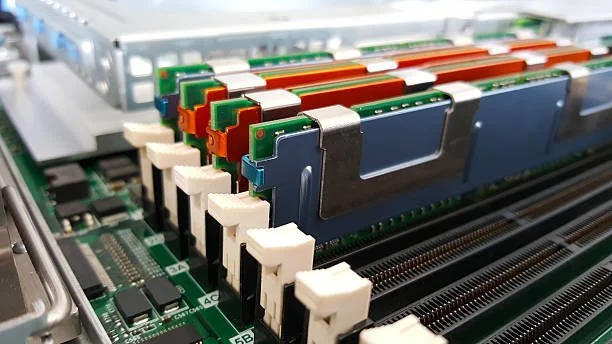
Modern businesses depend on reliable server infrastructure to support applications, data storage, virtualization, and cloud-based workloads. As workloads become more demanding, memory often becomes one of the first hardware components that limits server performance. Upgrading server memory is one of the most effective ways to improve responsiveness, increase workload capacity, and extend the life of existing hardware.
Organizations using Supermicro servers can significantly improve performance by investing in compatible memory upgrades. Whether supporting virtualization environments, databases, analytics platforms, or business-critical applications, selecting the right supermicro server memory solution can help maximize efficiency while avoiding unnecessary hardware replacement costs.
Why Supermicro Server Memory Upgrades Matter for Modern IT Environments
The Impact of Memory on Server Performance
Memory plays a critical role in determining how efficiently a server processes data and handles multiple workloads simultaneously. When available memory becomes insufficient, servers rely more heavily on storage systems, resulting in slower application response times and increased latency.
Adequate memory enables servers to store frequently accessed information closer to the processor, reducing delays and improving overall performance. This becomes particularly important in environments that support multiple users, applications, and virtual machines.
Supporting Business Growth Through Scalable Infrastructure
As organizations expand, their infrastructure requirements increase. More users, larger databases, and additional applications place greater demands on server resources.
Upgrading memory provides a scalable way to accommodate growth without replacing entire server systems. Memory upgrades allow businesses to increase capacity while maintaining existing hardware investments, making them a practical and cost-effective infrastructure strategy.
Understanding Supermicro Server Memory Specifications
Types of Supermicro RAM Used in Enterprise Servers
Supermicro servers support various memory technologies depending on the server generation and processor platform. Common memory options include:
DDR4 Registered DIMMs (RDIMM)
DDR4 Load Reduced DIMMs (LRDIMM)
DDR5 RDIMM modules
ECC memory configurations
High-capacity enterprise memory modules
Error Correcting Code (ECC) memory is particularly important in enterprise environments because it helps detect and correct memory errors, improving system stability and reliability.
Capacity, Speed, and Compatibility Considerations
Selecting memory involves more than simply choosing the highest capacity module available. IT teams must evaluate several factors:
Maximum supported memory capacity
Memory speed compatibility
Processor limitations
DIMM slot configuration
ECC requirements
Registered or Load Reduced architecture
Proper compatibility verification ensures that the upgraded memory operates at optimal performance levels while maintaining system stability.
Signs Your Server Needs a Supermicro Memory Upgrade
Performance Bottlenecks and Resource Limitations
Several indicators suggest that a memory upgrade may be necessary. Servers experiencing frequent performance slowdowns often suffer from insufficient available memory.
Common symptoms include:
Slow application performance
Increased disk activity caused by memory paging
Delayed database queries
Reduced system responsiveness
Resource contention among workloads
Monitoring system utilization can help identify whether memory has become a performance bottleneck.
Increasing Demands From Applications and Virtual Machines
Modern enterprise applications require substantially more memory than previous generations of software. Virtualized environments further amplify memory requirements because each virtual machine requires dedicated resources.
As organizations deploy additional virtual machines, containers, and cloud-connected services, memory demand grows significantly. Upgrading server memory ensures these workloads continue operating efficiently.
Benefits of Upgrading Supermicro RAM
Improved System Performance and Responsiveness
One of the most immediate benefits of upgrading memory is improved system responsiveness. Additional memory allows servers to process larger workloads while minimizing reliance on slower storage-based operations.
Benefits include:
Faster application loading
Reduced latency
Improved multitasking capabilities
Better user experiences
Increased workload efficiency
These improvements contribute directly to operational productivity and infrastructure effectiveness.
Enhanced Support for Virtualization and Data Processing
Virtualized environments depend heavily on memory availability. Memory upgrades enable organizations to host more virtual machines while maintaining performance standards.
At Ram Exchange, businesses can find enterprise-grade memory solutions designed to support virtualization, database management, cloud workloads, and other demanding server applications. Access to properly tested memory components helps ensure consistent performance and long-term reliability.
How to Choose the Right Supermicro Server Memory
Matching Memory Modules to Server Models
Every Supermicro server model has specific memory requirements. Selecting compatible modules requires identifying:
Server model number
Processor generation
Supported memory type
Maximum DIMM capacity
Supported memory speeds
Reviewing hardware specifications before purchasing helps prevent compatibility issues and installation delays.
Balancing Capacity Requirements and Budget Goals
Memory planning should address both current and future workload requirements. While larger memory configurations provide greater flexibility, organizations should balance performance objectives with budget constraints.
Capacity planning should consider:
Current utilization levels
Future growth projections
Virtualization expansion plans
Database growth expectations
Analytics requirements
A well-planned memory strategy helps maximize return on investment while supporting future scalability.
Common Workloads That Benefit From Memory Upgrades
Virtualization, Cloud Computing, and Databases
Many enterprise workloads are highly dependent on memory resources. Virtualization platforms require substantial memory allocations to support multiple guest operating systems simultaneously.
Similarly, cloud infrastructure environments and database platforms rely heavily on memory for caching, transaction processing, and query execution.
Additional memory helps these workloads achieve higher performance while reducing resource contention.
AI, Analytics, and High-Performance Business Applications
Artificial intelligence, machine learning, and analytics workloads process large datasets that consume significant memory resources. Business intelligence platforms also benefit from expanded memory capacity because they frequently perform complex calculations and data analysis.
Organizations evaluating alternative enterprise memory solutions for mixed-vendor environments may also explore options such as Cisco ram when managing broader data center infrastructure requirements. Selecting the appropriate memory configuration for each platform helps maintain consistent performance across enterprise environments.
Best Practices for Installing Supermicro Memory
Preparing Servers for a Memory Upgrade
Proper preparation helps ensure a successful memory installation process.
Recommended preparation steps include:
Review server documentation.
Verify memory compatibility.
Back up critical data.
Schedule maintenance windows.
Follow manufacturer installation guidelines.
Careful planning minimizes downtime and reduces the risk of configuration issues.
Verifying Performance and Stability After Installation
Following installation, administrators should validate system performance and stability through testing.
Verification procedures may include:
Memory diagnostics
System monitoring
Performance benchmarking
Virtual machine validation
Application testing
Post-installation testing confirms that the upgrade functions correctly and delivers the expected performance improvements.
Common Mistakes to Avoid During Memory Upgrades
Compatibility and Configuration Errors
Memory upgrades can fail to deliver expected results when compatibility requirements are overlooked.
Common mistakes include:
Mixing incompatible memory types
Using unsupported capacities
Installing incorrect DIMM configurations
Ignoring BIOS requirements
Selecting non-qualified memory modules
Thorough compatibility verification helps avoid these issues.
Overlooking Future Expansion Requirements
Some organizations focus solely on immediate memory needs without considering future growth.
A forward-looking upgrade strategy should preserve available expansion capacity whenever possible. Leaving room for future upgrades reduces long-term infrastructure costs and simplifies scaling efforts.
Choosing a Reliable Supplier for Supermicro RAM
Importance of Quality Assurance and Testing
Memory quality directly impacts server reliability. Enterprise environments require thoroughly tested components that meet strict performance and stability standards.
Quality assurance processes should include:
Compatibility testing
Performance validation
Error detection verification
Burn-in testing
Reliability assessments
These measures help reduce deployment risks and improve long-term system stability.
Evaluating Warranty Coverage and Technical Support
Beyond product quality, supplier support services play an important role in successful memory deployments.
Organizations should evaluate:
Warranty coverage
Technical expertise
Compatibility assistance
Replacement policies
Product availability
Working with an experienced supplier helps simplify procurement and deployment processes.
How RAM Exchange Supports Supermicro Memory Upgrades
Enterprise-Grade Memory Solutions for Supermicro Servers
RAM Exchange provides enterprise-focused memory solutions designed to support a wide range of Supermicro server platforms. Their inventory includes memory options suitable for virtualization environments, databases, cloud infrastructure, and other business-critical workloads.
Organizations can access tested and validated memory configurations that align with specific server requirements, helping reduce deployment uncertainty and improve upgrade success rates.
Expert Guidance for Capacity Planning and Compatibility
Selecting server memory often involves evaluating compatibility requirements, workload demands, and future growth plans.
RAM Exchange assists organizations by providing guidance on:
Memory compatibility
Capacity planning
Performance optimization
Upgrade strategies
Infrastructure scalability
This expertise helps businesses make informed purchasing decisions while maximizing the value of their server investments.
Conclusion
Supermicro memory upgrades provide a practical and cost-effective way to improve server performance, support growing workloads, and extend infrastructure lifespan. By understanding compatibility requirements, workload demands, and future capacity needs, organizations can make informed decisions that maximize performance and reliability.
Whether supporting virtualization, databases, analytics, or cloud environments, the right memory upgrade can significantly enhance operational efficiency while reducing infrastructure limitations.
Need Memory Assistance? Contact the experts today: Get Expert Support
FAQs
1. How do I determine if my Supermicro server needs a memory upgrade?
Monitoring memory utilization, application performance, and system responsiveness can help identify memory-related bottlenecks. Frequent paging, slow application performance, and high memory usage often indicate a need for additional memory.
2. What type of RAM is compatible with Supermicro servers?
Compatibility depends on the specific server model and processor generation. Common options include DDR4 RDIMM, DDR4 LRDIMM, DDR5 RDIMM, and ECC memory modules.
3. Does increasing server memory improve virtualization performance?
Yes. Additional memory allows more virtual machines to operate efficiently while reducing resource contention and improving overall host performance.
4. Can I mix different memory capacities in a Supermicro server?
While some systems support mixed capacities, following the manufacturer's guidelines is recommended to maintain optimal performance and compatibility.
5. Why is ECC memory important for enterprise servers?
ECC memory helps detect and correct memory errors automatically, improving system stability, data integrity, and overall server reliability.