Enterprise applications require powerful server resources to maintain performance, reliability, and scalability. As workloads become more demanding, standard memory configurations may not provide enough capacity to support virtualization, databases, analytics platforms, and business applications.
A properly planned dell server 256gb ram configuration provides additional memory capacity that helps Dell PowerEdge servers manage complex workloads more efficiently. Selecting the correct memory type, speed, and configuration ensures better performance while maintaining long term server reliability.
Understanding the Importance of High-Capacity Memory in Enterprise Servers
High capacity memory plays an important role in modern enterprise infrastructure. Servers depend on RAM to store and process active workloads efficiently, allowing applications and services to operate without unnecessary delays.
How RAM Capacity Impacts Enterprise Application Performance
RAM capacity directly affects how quickly enterprise applications can access and process required data. When sufficient memory is available, applications can operate smoothly while reducing dependency on slower storage resources.
Higher memory capacity allows servers to handle more simultaneous processes and maintain consistent performance during demanding operations. This makes memory an essential component for businesses running resource intensive applications.
Role of Memory in Data Center Workload Optimization
Data centers rely on efficient resource utilization to support multiple workloads across server environments. Adequate memory capacity helps distribute workloads more effectively and improves overall infrastructure efficiency.
A balanced memory configuration allows processors to access required information faster, reducing performance limitations and improving workload management across enterprise systems.
Why Businesses Choose Higher Memory Configurations
Organizations choose higher memory configurations because modern applications require more resources to operate effectively. Increased RAM capacity provides greater flexibility for handling growing workloads while supporting future expansion requirements.
A Dell server configured with 256GB RAM provides a strong foundation for enterprise environments that require reliable performance and scalable computing resources.
Benefits of Dell Server 256GB RAM Configurations
A 256GB memory configuration offers several advantages for enterprise servers. It improves resource availability, supports advanced workloads, and helps organizations optimize their existing Dell PowerEdge infrastructure.
Supporting Demanding Enterprise Workloads
Enterprise applications often require significant memory resources to maintain stable performance. A higher RAM configuration allows servers to process larger workloads while maintaining consistent application responsiveness.
Additional memory capacity helps reduce resource constraints and enables servers to support more intensive computing requirements.
Improving Multitasking and Application Responsiveness
Multiple applications running simultaneously require sufficient memory to operate efficiently. When a server has adequate RAM, applications can access required resources faster and maintain better responsiveness.
A 256GB RAM configuration provides additional capacity for handling multiple services without creating unnecessary performance limitations.
Enhancing Virtualization and Database Performance
Virtualization environments and database systems depend heavily on available memory resources. Additional RAM allows virtual machines and databases to access more resources, improving stability and efficiency.
Higher memory capacity helps organizations create better optimized server environments where workloads can run more effectively.
Dell Server Memory Capacity Planning for Enterprise Environments
Proper memory planning helps organizations select the right configuration based on current requirements and future growth. A strategic approach ensures that server resources remain effective as workloads increase.
Evaluating Current and Future Memory Requirements
Before upgrading server memory, businesses should evaluate existing resource usage and future workload expectations.
Understanding application requirements, virtualization needs, and expected growth helps determine the appropriate memory capacity for the server environment.
Matching RAM Capacity With Business Applications
Different applications require different levels of memory resources. Enterprise databases, virtualization platforms, analytics systems, and cloud applications often require higher capacity configurations.
Matching RAM capacity with application requirements ensures that servers provide sufficient resources without unnecessary hardware investment.
Planning Scalable Memory Upgrades for PowerEdge Servers
Scalability is an important consideration when planning server upgrades. Dell PowerEdge systems support different memory configurations depending on the server model, processor, and supported DIMM technology.
Planning future expansion helps organizations add memory when requirements increase while maintaining compatibility with existing hardware.
Choosing the Right Dell Server 256GB RAM Configuration
Selecting the correct 256GB RAM configuration requires understanding server specifications and workload requirements. Memory selection should consider compatibility, performance needs, and future scalability.
Selecting Compatible Memory Modules for Dell PowerEdge Servers
Dell PowerEdge servers support specific memory modules based on their hardware architecture. Selecting compatible modules ensures reliable communication between memory, processors, and other server components. Businesses looking for dependable enterprise memory options can explore RAM Exchange for compatible Dell server memory solutions designed to support various PowerEdge configurations and workload requirements.
Using unsupported memory can result in reduced performance, recognition issues, or system instability. Reviewing server compatibility requirements before purchasing memory helps prevent upgrade problems.
Understanding DIMM Types, Speed, and Memory Architecture
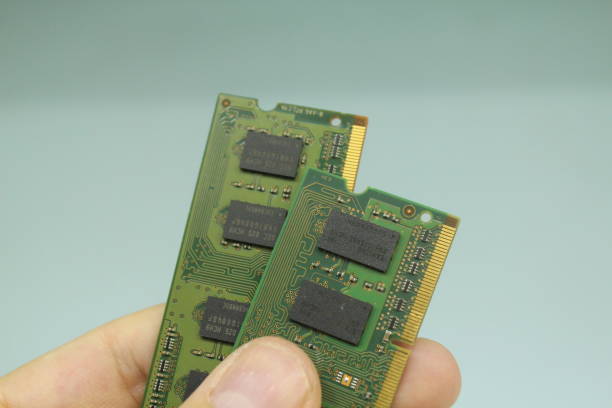
Enterprise servers commonly use memory technologies such as RDIMM and LRDIMM depending on capacity requirements and system design.
Memory speed, rank, and architecture affect overall performance. Choosing the correct combination ensures that the server operates efficiently while maintaining stability.
Balancing Performance, Capacity, and Budget Considerations
A successful memory upgrade requires balancing performance requirements with budget considerations.
Organizations should evaluate whether they need maximum capacity, higher memory speed, or additional expansion flexibility. Selecting the right configuration provides better value while meeting current and future workload requirements.
Dell PowerEdge Server RAM Options for 256GB Configurations
Dell PowerEdge servers support various memory configurations depending on the model and hardware generation. Understanding available options helps businesses select the right solution for their infrastructure needs.
Supported Memory Capacities Across PowerEdge Server Models
Different PowerEdge server models support different memory capacities and configurations. Factors such as processor generation, number of DIMM slots, and supported memory technology determine available options.
A 256GB RAM configuration can be achieved using different DIMM combinations depending on the server model and performance requirements.
ECC Memory Requirements for Enterprise Reliability
ECC memory is essential for enterprise environments because it helps detect and correct certain memory errors.
This technology improves data accuracy and system reliability, making it suitable for servers that support important business applications. Dell PowerEdge systems commonly use ECC memory configurations to maintain dependable performance.
RDIMM and LRDIMM Options for High-Capacity Deployments
RDIMMs provide improved stability and are widely used in enterprise server environments. LRDIMMs allow higher memory capacities by reducing memory load on the server architecture.
The choice between RDIMM and LRDIMM depends on the PowerEdge model, workload requirements, and desired memory capacity.
Enterprise Applications That Benefit From 256GB Server Memory
High-capacity memory configurations are designed to support applications that require significant computing resources. Dell server 256GB RAM configurations provide additional capacity for workloads that depend on fast data access, stable processing, and efficient resource management.
Virtualization Platforms and Multiple Virtual Machines
Virtualization environments rely heavily on available memory because multiple virtual machines share resources from the same physical server.
A 256GB RAM configuration allows administrators to allocate sufficient memory resources to multiple virtual machines while maintaining better workload distribution. Additional memory capacity reduces resource limitations and helps virtualized environments operate more efficiently.
Database and Analytics Workloads
Database applications require reliable memory resources to process large volumes of information efficiently. Higher memory capacity allows databases to manage active operations more effectively and maintain consistent performance.
Analytics workloads also benefit from additional RAM because processing large datasets requires sufficient memory availability. A properly configured Dell PowerEdge server helps improve resource utilization for demanding data processing requirements.
AI, Cloud Infrastructure, and Resource-Intensive Applications
Modern applications such as artificial intelligence platforms, cloud infrastructure, and advanced computing environments require significant memory capacity.
A 256GB RAM configuration provides additional resources for applications that depend on high-performance computing capabilities. This allows organizations to build more efficient infrastructure while supporting evolving technology requirements.
Best Practices for Installing Dell Server 256GB RAM
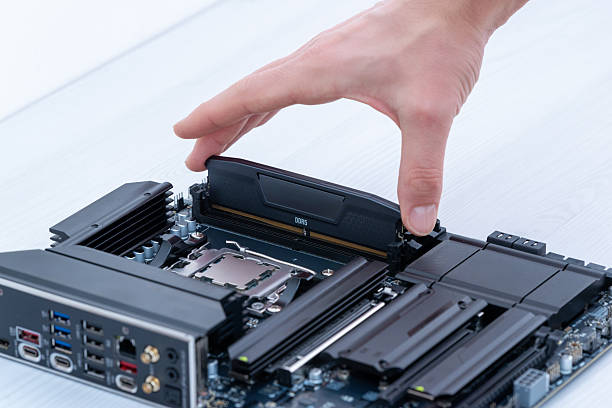
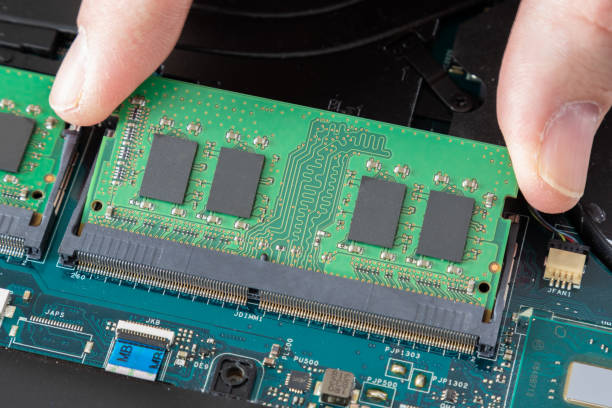
Proper installation practices are essential to ensure that high-capacity memory configurations deliver expected performance. Following Dell recommended guidelines helps maintain stability and prevents common upgrade issues. Dell provides specific memory configuration recommendations based on server models, supported DIMM types, and processor configurations.
Following Dell Memory Population Guidelines
Dell PowerEdge servers use specific memory slot population rules to maintain optimal performance.
Installing memory modules according to recommended configurations helps ensure balanced communication between processors and memory channels. Incorrect placement may reduce performance or prevent the system from using the installed capacity effectively.
Maintaining Balanced Memory Channel Configuration
Balanced memory channel configuration improves bandwidth and system efficiency.
Using matching memory modules with similar specifications helps maintain consistent performance across the server. Memory capacity, DIMM type, speed, and rank should be considered when creating a balanced configuration.
Testing and Monitoring Performance After Installation
After completing a RAM upgrade, administrators should verify that the server recognizes the full memory capacity.
Performance monitoring helps identify improvements and ensures that workloads are operating efficiently. Regular monitoring also helps detect future resource requirements and supports proactive infrastructure management.
Common Mistakes When Upgrading to High Capacity RAM Modules
Upgrading to higher memory capacity requires careful planning. Incorrect memory selection or installation can create compatibility problems and reduce expected performance.
Using Incompatible Memory Specifications
One of the most common upgrade mistakes is selecting memory modules that do not match server requirements.
Factors such as memory generation, DIMM type, speed, and capacity must be compatible with the Dell PowerEdge server. Using unsupported modules can result in recognition problems or unstable operation. Dell PowerEdge systems support specific DIMM technologies, including RDIMM and LRDIMM configurations depending on the server model.
Ignoring Server Model and Processor Limitations
Server processors determine supported memory speeds, capacities, and configurations.
Ignoring processor limitations may result in memory operating below expected performance levels or failing to support the planned configuration. Reviewing server specifications before upgrading helps avoid compatibility issues.
Overlooking Future Expansion Requirements
A memory upgrade should consider future workload growth rather than only current requirements.
Choosing a scalable configuration provides flexibility for future expansion and helps organizations avoid replacing memory modules unnecessarily. Proper planning ensures that the server infrastructure can support increasing demands over time.
Why Choose RAM Exchange for Dell Server Memory Solutions
Selecting the right memory provider is an important part of a successful server upgrade. Enterprise environments require reliable memory solutions that meet compatibility requirements and provide consistent performance.
Organizations can rely on experienced suppliers to identify suitable memory configurations for Dell PowerEdge systems and support efficient infrastructure upgrades.
Reliable Dell Server 256GB RAM Options
RAM Exchange provides enterprise memory options designed to support Dell server environments. Their solutions help businesses find suitable memory configurations based on server requirements, workload demands, and expansion goals.
Compatible PowerEdge Server RAM for Enterprise Needs
Compatibility is essential when upgrading Dell PowerEdge servers. RAM Exchange focuses on providing memory solutions that align with enterprise server specifications.
Selecting compatible memory helps maintain system reliability while improving performance for demanding applications.
Support for Data Center Memory Upgrades
Data center environments require memory upgrades that deliver stability, scalability, and consistent performance.
RAM Exchange supports organizations with memory solutions designed for enterprise workloads, helping businesses improve server efficiency and extend infrastructure capabilities.
For organizations planning server improvements, this Server RAM Upgrade Guide provides additional information about selecting and upgrading compatible server memory configurations.
Conclusion
A Dell server 256GB RAM configuration provides businesses with the memory capacity required to support virtualization, databases, analytics, cloud infrastructure, and other resource-intensive applications.
Selecting the right memory configuration requires careful consideration of server compatibility, DIMM specifications, ECC requirements, and future scalability. Proper installation practices and balanced memory configurations help ensure reliable performance and efficient resource utilization.
For assistance selecting compatible Dell server memory solutions, businesses can contact RAM Exchange for expert guidance and enterprise memory support.
FAQs
1. Why should businesses consider a Dell server 256GB RAM configuration?
A 256GB RAM configuration provides additional memory capacity for demanding workloads such as virtualization, databases, analytics, and enterprise applications. It improves resource availability and supports better server performance.
2. Is 256GB RAM compatible with all Dell PowerEdge servers?
No. Compatibility depends on the specific PowerEdge server model, processor generation, supported DIMM type, and motherboard architecture. Checking server specifications is necessary before upgrading.
3. What type of memory is used in Dell PowerEdge servers?
Dell PowerEdge servers commonly support enterprise memory types such as ECC RDIMMs and LRDIMMs depending on the server generation and configuration requirements.
4. Does increasing RAM improve virtualization performance?
Yes. Additional RAM allows virtual machines to access more resources, improves workload distribution, and helps maintain stable performance in virtualized environments.
5. What should I check before installing 256GB RAM in a Dell server?
Before installation, check the server model, processor compatibility, supported memory type, RAM speed, DIMM configuration, and available expansion capacity to ensure a successful upgrade.