
How to Install Supermicro RAM Correctly
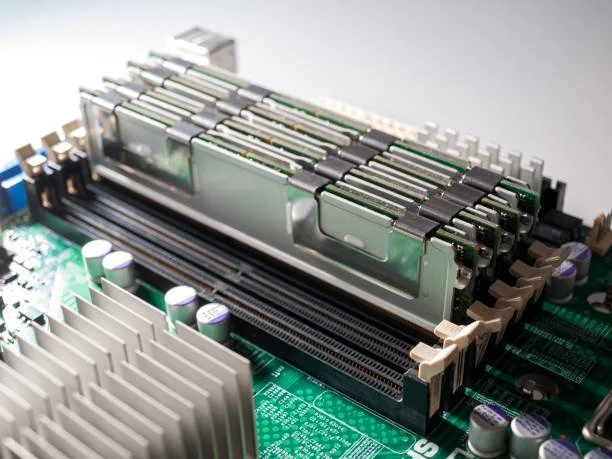
Installing memory correctly is one of the most important aspects of maintaining a stable and high-performing server environment. Whether you are expanding capacity to support additional workloads or replacing existing modules, proper installation procedures help ensure optimal performance and long-term reliability. While Supermicro servers are designed to support scalable memory configurations, the installation process requires careful planning and attention to compatibility requirements.
A successful upgrade begins with understanding the hardware specifications of the server and selecting memory that meets those requirements. Following established installation guidelines can help prevent boot failures, memory recognition issues, and performance limitations. Before beginning the upgrade process, it is important to familiarize yourself with the fundamentals of supermicro ram installation to ensure the new memory operates correctly within the server environment.
Understanding Supermicro RAM Installation Basics
Server memory upgrades may appear straightforward, but enterprise systems require more attention than standard desktop hardware. Memory modules must be installed in specific slots and configurations to allow processors and memory controllers to function properly.
Understanding the basic principles behind memory installation helps administrators avoid common mistakes and ensures the server can fully utilize the installed memory capacity.
Why Proper Memory Installation Matters
Memory directly influences server performance, virtualization efficiency, database operations, and application responsiveness. Improperly installed memory can lead to system instability, reduced performance, or hardware recognition failures that affect overall operations.
Correct installation ensures that memory channels operate as intended and that processors can access data efficiently. It also helps maintain reliability by minimizing configuration issues that may otherwise create operational disruptions. Following proper installation procedures allows organizations to achieve the full benefits of their memory investment.
Common Types of Supermicro Memory Modules
Supermicro servers support a variety of memory technologies depending on the platform generation and processor architecture. Enterprise environments commonly use Registered DIMMs, Load Reduced DIMMs, ECC memory modules, and newer DDR5 memory solutions.
Each memory type is designed for specific performance and capacity requirements. Some servers support only certain memory technologies, making compatibility verification an essential part of the installation process. Understanding the differences between supported memory types helps ensure that selected modules meet both performance and system requirements.
Preparing for a Supermicro RAM Installation
Preparation is one of the most important stages of a successful memory upgrade. Taking time to review hardware specifications and installation requirements reduces the likelihood of problems during deployment.
A structured preparation process helps administrators avoid compatibility issues while ensuring the installation can be completed efficiently and safely.
Checking Server Compatibility and Memory Specifications
Before installing new memory, administrators should review the server documentation to verify supported capacities, speeds, and module types. Every Supermicro server has specific requirements that determine which memory configurations can be used successfully.
Compatibility verification should include motherboard specifications, processor support, memory channel requirements, and maximum capacity limitations. Installing unsupported modules can prevent the system from recognizing memory correctly or may reduce performance by forcing the system to operate below its intended specifications.
Gathering Tools and Following Safety Precautions
Although memory installation does not require specialized equipment, proper handling procedures remain critical. Server components are sensitive to electrostatic discharge, which can damage both memory modules and motherboard circuitry.
The server should be completely powered down and disconnected from all power sources before installation begins. A clean work environment and anti-static precautions help protect hardware during the upgrade process. Careful handling of memory modules also reduces the risk of physical damage to connectors and components.
At Ram Exchange, organizations can find enterprise-grade memory solutions that are tested for compatibility and reliability, helping simplify the preparation process and reduce deployment concerns.
How to Identify the Correct Memory Slots
Installing memory into the wrong slots is one of the most common causes of performance issues and memory recognition problems. Supermicro motherboards are designed to follow specific channel population rules that must be followed carefully.
Understanding slot layouts and population requirements ensures that memory operates at maximum efficiency after installation.
Understanding DIMM Slot Layouts on Supermicro Motherboards
Most Supermicro server motherboards include multiple memory channels connected directly to the processor. Each channel contains designated DIMM slots that must be populated according to the manufacturer's guidelines.
Slot labels are typically printed directly on the motherboard and correspond to documented installation sequences. Understanding how these channels are organized allows administrators to distribute memory evenly across available resources, maximizing bandwidth and overall system performance.
Reading Memory Population Guidelines Correctly
Supermicro documentation provides detailed instructions regarding memory population order. These guidelines specify which slots should be filled first and how additional modules should be installed as capacity increases.
Following the recommended sequence ensures balanced memory operation and helps maintain optimal throughput. Ignoring population rules can reduce performance and, in some cases, prevent the server from recognizing all installed memory modules.
Step-by-Step Supermicro RAM Installation Process
Once preparation and compatibility verification are complete, the installation process can begin. Careful execution during this stage helps ensure successful deployment and minimizes potential hardware issues.
Following a systematic approach improves installation accuracy and reduces the likelihood of configuration errors.
Powering Down and Accessing the Server Hardware
The first step is to shut down the operating system properly and disconnect all power sources. Once the server is powered off, the chassis can be opened according to the manufacturer's service instructions.
Accessing internal components should be done carefully to avoid disturbing existing hardware connections. Before handling memory modules, administrators should verify that all residual power has been discharged from the system.
Installing Memory Modules in the Correct Sequence
Memory modules should be installed according to the slot population guidelines provided by Supermicro. Each module should be aligned carefully with the DIMM slot to ensure the notch matches the connector orientation.
Applying even pressure during installation allows the module to seat properly within the slot. The process should be repeated in the correct sequence until all planned memory modules have been installed.
Securing RAM Modules Properly in DIMM Slots
After insertion, retention clips should engage fully to secure each module in place. Improperly seated memory is one of the most common causes of post-installation errors and boot failures.
A visual inspection should be performed to confirm that every module sits evenly within its slot and that retention mechanisms are locked correctly. Ensuring secure installation helps prevent intermittent hardware recognition issues.
Verifying Supermicro Memory After Installation
Verification is a critical step that confirms the server recognizes and utilizes the newly installed memory. Even when installation appears successful, validation procedures help identify configuration issues before production workloads are affected.
A thorough verification process ensures that the upgrade delivers the expected performance improvements.
Checking BIOS and System Recognition
After powering on the server, administrators should access the BIOS or system management interface to confirm memory detection. The reported capacity should match the installed configuration.
Any discrepancies should be investigated immediately before the server is returned to production. Early identification of issues helps avoid performance problems and operational disruptions.
Confirming Capacity, Speed, and Configuration Settings
Beyond total capacity, administrators should verify memory speed and channel configuration. Systems may automatically adjust operating frequencies based on processor limitations or module compatibility.
Organizations managing mixed vendor environments often review additional enterprise memory options such as cisco ram memory when evaluating broader infrastructure upgrade strategies. Regardless of platform, confirming memory configuration ensures hardware performs according to design specifications.
Troubleshooting Common Supermicro RAM Installation Issues
Even properly planned upgrades can occasionally encounter problems. Understanding common installation issues helps administrators identify and resolve concerns efficiently.
Most memory-related issues can be traced to compatibility, installation, or configuration errors.
Server Fails to Detect New Memory
When newly installed memory is not detected, the first step is to verify that modules are fully seated and installed in the correct slots. Improper installation remains one of the most frequent causes of recognition failures.
Compatibility verification should also be reviewed to ensure the installed modules meet server requirements. Updating system firmware may also resolve recognition issues in certain situations.
Memory Errors, Beep Codes, and Boot Problems
Memory-related boot failures often generate diagnostic beep codes or hardware alerts. These indicators can help identify specific installation or compatibility problems.
Troubleshooting typically involves reseating modules, testing individual DIMMs, reviewing population order, and verifying configuration settings. Systematic testing helps isolate the root cause and restore normal operation.
Best Practices for Optimizing Memory Performance
Installing memory successfully is only part of the process. Proper configuration and planning help maximize long-term performance and scalability.
Organizations that take a strategic approach to memory management often achieve better infrastructure efficiency and lower upgrade costs over time.
Maintaining Balanced Memory Configurations
Balanced memory configurations allow processors to access memory resources efficiently across all available channels. Uneven population can reduce bandwidth and limit performance.
Maintaining symmetry across channels helps maximize throughput while ensuring workloads receive consistent access to system resources. This approach supports both performance and stability objectives.
Planning Future Supermicro Memory Upgrades
Memory planning should consider future business growth and evolving workload requirements. Leaving available expansion capacity simplifies future upgrades and reduces deployment complexity.
A long-term approach to memory management helps organizations scale infrastructure efficiently while minimizing disruption to existing operations.
Common Mistakes to Avoid During RAM Installation
Avoiding common installation errors can save significant time and prevent unnecessary troubleshooting. Many issues occur because compatibility requirements or manufacturer guidelines are overlooked.
Careful planning and attention to detail help reduce risks throughout the installation process.
Mixing Incompatible Memory Modules
Combining different memory technologies, capacities, or specifications can create stability and performance issues. Some servers may refuse to boot when incompatible modules are installed together.
Using matched and validated memory configurations helps ensure reliable operation and simplifies future expansion efforts.
Ignoring Manufacturer Population Rules
Population guidelines exist to optimize memory channel performance and maintain compatibility. Ignoring these recommendations can reduce performance and prevent proper system recognition.
Following documented installation procedures ensures the server utilizes available memory resources effectively while maintaining system stability.
When to Seek Professional Assistance
While many memory upgrades can be completed internally, certain environments involve greater complexity and may benefit from specialized expertise.
Professional guidance can help reduce deployment risks and improve upgrade outcomes in demanding enterprise environments.
Complex Multi-Processor Server Configurations
Servers containing multiple processors often have sophisticated memory architectures with strict population requirements. Incorrect configurations may impact performance or reduce available capacity.
Professional assistance helps ensure memory is installed according to platform-specific requirements and optimized for maximum efficiency.
Large-Scale Enterprise Memory Upgrade Projects
Enterprise-wide upgrades involving multiple servers require detailed planning, compatibility verification, and deployment coordination. Managing large projects successfully often requires specialized experience and technical resources.
Professional support can streamline deployment activities while helping organizations minimize downtime and operational risk.
Conclusion
Installing Supermicro RAM correctly is essential for maximizing server performance, maintaining stability, and supporting future growth. By following proper preparation procedures, verifying compatibility, adhering to memory population guidelines, and performing post-installation validation, organizations can ensure successful memory deployments that deliver long-term value.
Whether upgrading a single server or planning a larger infrastructure expansion, careful installation practices help reduce risk and improve overall system efficiency.
Need Expert Help? Contact Our Team
FAQs
1. How do I know which RAM is compatible with my Supermicro server?
You should review the server model specifications, processor requirements, supported memory types, and maximum capacity limits before purchasing memory modules.
2. Can I install Supermicro RAM without shutting down the server?
Most standard memory upgrades require a complete system shutdown and power disconnection before installation. Always follow manufacturer guidelines.
3. Why is my server not detecting newly installed memory?
Common causes include improperly seated modules, unsupported memory types, incorrect slot population, or outdated firmware.
4. Does memory installation order matter in Supermicro servers?
Yes. Supermicro motherboards follow specific population rules that determine which DIMM slots should be filled first for optimal performance.
5. How can I verify that a memory upgrade was successful?
Check the BIOS, operating system, and hardware management tools to confirm the server recognizes the correct memory capacity, speed, and configuration.