When Should You Upgrade Supermicro Server RAM?
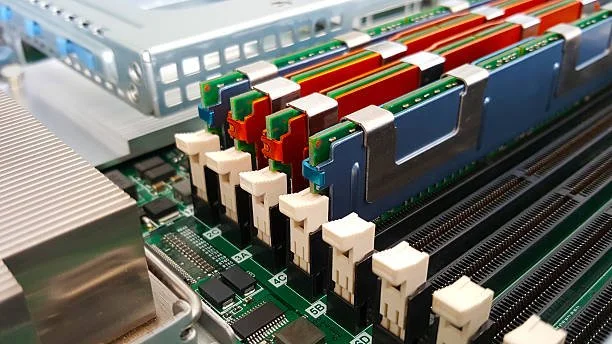
Modern enterprise workloads push datacenter hardware to its limits. System administrators and IT managers frequently face a critical question: should you invest in an entirely new server architecture, or can targeted hardware enhancements resolve your system constraints? For organizations that run Supermicro hardware, optimizing your physical memory configuration delivers one of the highest returns on investment. A planned upgrade of supermicro server ram eliminates processing latency, unlocks idle CPU cores, and increases host consolidation density without the steep capital expense of a full system replacement.
Navigating these hardware transitions requires a clear understanding of capacity ceilings, memory channel population rules, and performance metrics. At RAM Exchange, we help IT professionals assess, source, and integrate reliable memory hardware to keep mission-critical infrastructure running at peak efficiency.
Clear Indicators That Your Supermicro Server Needs a RAM Upgrade
Memory starvation rarely announces itself with immediate hardware failure. Instead, it surfaces as subtle, compounding operational bottlenecks that degrade end-user response times and trigger resource alarms.
Common Memory Pressure Signals
High Swap Usage: The operating system actively pages data to secondary storage pools.
Ballooning & OOM Events: Hypervisors reclaim guest pages or the OS kernel terminates active processes.
CPU I/O Wait Bottlenecks: Processor cores sit idle waiting for storage-based retrieval rather than executing code.
Chronic Memory Saturation and Paging
When an operating system exhausts its available physical memory, it offloads memory pages to secondary storage pools via swap space or pagefiles. Even modern PCIe Gen 4 NVMe solid-state drives operate orders of magnitude slower than direct DRAM channels. High active swap usage means your processor cores spend critical cycles in an I/O wait state rather than executing application code.
Excessive Hypervisor Ballooning and VM Throttling
In virtualized clusters running VMware ESXi, Proxmox, or Microsoft Hyper-V, memory is almost always the first physical constraint reached. Once a host crosses its target memory threshold, the hypervisor activates memory ballooning drivers to reclaim pages from guest virtual machines. When guest OS memory compression fails to free sufficient space, hypervisor swapping begins. This severely impacts guest VM performance and limits consolidation ratios.
Application Crashes and Out-of-Memory (OOM) Errors
For in-memory database engines like Redis, SAP HANA, and Microsoft SQL Server, memory exhaustion triggers catastrophic failures. Linux kernels deploy the Out-of-Memory (OOM) killer to terminate high-memory processes to keep the host alive. If your database or container workloads crash unpredictably during peak compute hours, your current memory pool cannot handle standard application concurrency.
Workload Demands That Trigger Memory Expansion
Planning server upgrades requires evaluating how your specific workload interacts with system architecture. Different applications stress system memory in unique ways:
Virtualization & VDI: Guest VM sprawl exceeds physical memory limits. The primary objective is to maximize gigabyte capacity per CPU socket.
Databases (SQL / NoSQL): In-memory indexing and buffer pools overflow to disk. The primary objective is to reduce read and write latency via massive RAM caching.
AI / Machine Learning: Large batch sizes and model weights stall compute pipelines. The primary objective is to feed high-bandwidth data directly to accelerators.
Container Pods (Kubernetes): Pod memory limits cause frequent OOMKilled events. The primary objective is to provide burst buffers across dense cluster nodes.
According to benchmark research on enterprise architectures published by the IEEE Computer Society, non-optimal memory thread placement and physical resource contention in virtualized multi-socket NUMA systems can degrade operational transaction speeds by up to 400 percent when workloads cross remote memory boundaries. Expanding your physical memory pools prevents these severe degradation spikes.
Organizations balancing growth against strict operational budgets must select component upgrades strategically. As an established DRAM solutions provider, RAM Exchange specializes in helping IT teams configure Tier-1 compliant memory modules that match precise workload requirements.
Balancing CPU Utilization Against Memory Bandwidth
A common mistake in capacity planning is assuming that high CPU usage requires a processor upgrade. In many cases, processors run hot and slow simply because memory controllers cannot feed data across the channels fast enough.
Memory Interleaving Architecture
In a balanced dual-socket system:
CPU Socket 0 (Integrated Controller): Distributes traffic evenly across Channel A, Channel B, Channel C, and Channel D to deliver balanced multi-channel bandwidth.
CPU Socket 1 (Integrated Controller): Mirrors the layout across Channel A, Channel B, Channel C, and Channel D to ensure symmetric throughput.
Every generation of Intel Xeon Scalable and AMD EPYC processors features an integrated memory controller with a dedicated channel design:
Intel Xeon Scalable (1st & 2nd Gen): 6-channel memory architecture
Intel Xeon Scalable (3rd Gen - Ice Lake): 8-channel memory architecture
Intel Xeon Scalable (4th & 5th Gen - Sapphire Rapids / Emerald Rapids): 8-channel DDR5 architecture
AMD EPYC (7002 / 7003 Series): 8-channel DDR4 architecture
AMD EPYC (9004 Series - Genoa / Bergamo): 12-channel DDR5 architecture
When installing memory, populating all available channels in a balanced layout enables full memory interleaving. If you deploy a server with only two or four populated DIMM slots on an eight-channel processor, you limit the memory bandwidth of the CPU by up to 50 percent. Upgrading supermicro server ram to achieve a balanced configuration restores full memory bandwidth and prevents compute cores from starving for data.
Hardware and Architectural Considerations for Supermicro Upgrades
Supermicro server motherboards (including popular lines like the X11, X12, X13, H11, H12, and H13 series) support extensive memory expansion. However, strict architectural rules dictate what modules can run together.
DIMM Types: RDIMM vs. LRDIMM vs. 3DS RDIMM
You cannot mix different memory types within the same server:
RDIMM (Registered DIMM): Features an onboard register buffer between the memory controller and the DRAM chips. RDIMMs offer low latency, high stability, and moderate density, making them standard for general computing.
LRDIMM (Load-Reduced DIMM): Uses a dedicated buffer for both control lines and data lines. LRDIMMs reduce electrical load on the memory bus, allowing you to run higher densities and more DIMMs per channel without severe clock speed drops.
3DS RDIMM (Three-Dimensional Stacking): Uses through-silicon via (TSV) packaging to stack DRAM dies vertically. This format enables ultra-dense 128GB, 256GB, and 512GB modules for massive enterprise virtualization.
DIMMs Per Channel (DPC) Speed Reductions
Populating two DIMMs per channel (2 DPC) rather than one DIMM per channel (1 DPC) increases overall capacity, but older DDR4 architectures may automatically downclock the memory bus speed (for instance, dropping from 2933 MT/s to 2666 MT/s) to maintain signal integrity. Always review the motherboard population matrix before expanding capacity.
ECC Verification and Thermal Thresholds
Supermicro platforms require Error-Correcting Code (ECC) modules to detect and correct single-bit memory errors on the fly. When upgrading dense 1U or 2U rackmount servers, consider the thermal output of high-density modules. Ensure your chassis fan profiles provide adequate airflow across all memory banks.
To browse tested, enterprise-grade memory modules configured for specific generation sockets, explore the full selection of RAM Exchange products.
Cost-Benefit Analysis: RAM Upgrade vs. Full Server Replacement
A full server refresh introduces major expenses, including new CPU licensing, storage reconfiguration, chassis deployment, and labor hours. Extending the lifecycle of existing servers through targeted memory upgrades delivers significant operational and economic advantages.
A comprehensive infrastructure study published by the National Science Foundation (NSF PAR) highlights that memory subsystems account for a major portion of datacenter infrastructure costs and energy consumption. The study notes that when active working sets exceed physical memory boundaries, application performance drops by 8x to 25x, driving systemic underutilization across compute fleets. Resolving memory bottlenecks directly recovers this lost compute power at a fraction of full-system replacement costs.
Total Cost of Ownership (TCO) Comparison
Option A: Full System Replacement (High CapEx): Incurs expenses for new chassis hardware, dual processor sockets, new core-based hypervisor licenses, and extensive migration labor.
Option B: Targeted Supermicro RAM Expansion (Low CapEx): Utilizes enterprise DIMM modules on existing stable infrastructure, avoiding re-licensing fees while restoring peak throughput.
Upgrading memory allows system administrators to:
Extend the production lifecycle of dependable hardware by 24 to 36 months.
Avoid software and hypervisor re-licensing fees tied to core counts.
Maximize compute density within existing rack space and power budgets.
Reduce electronic waste and support corporate sustainability goals.
How RAM Exchange Maximizes Your Hardware Lifecycle
Executing a hardware upgrade requires dependable supply chains, rigorous component testing, and strategic lifecycle management. RAM Exchange provides comprehensive solutions for enterprise datacenters, system integrators, and growing businesses.
Comprehensive Lifecycle Support Workflow
Component Sourcing: Supplying DDR3, DDR4, and DDR5 modules from 1GB to 128GB and higher.
Quality Testing: Enforcing strict Tier-1 compliance checks and advanced diagnostic burn-in tests.
ITAD & Asset Buyback: Offsetting expansion expenses by purchasing retired legacy DIMM lots.
Certified Enterprise DRAM Sourcing
RAM Exchange supplies high-grade new, used, and refurbished memory across all major form factors, including DDR3, DDR4, and the latest DDR5 standards. Every module undergoes strict diagnostic testing to ensure Tier-1 compliance, complete reliability, and zero out-of-box failures. All memory solutions include a dependable one-year warranty.
Sustainable ITAD and Memory Buyback
When you upgrade your servers, your retired memory still holds tangible capital value. Through our specialized IT Asset Disposition (ITAD) services, you can safely offload decommissioned hardware. If you are preparing to retire legacy modules during your infrastructure refresh, sell to us to monetize surplus inventory, reduce disposal costs, and support certified environmental recycling.
Step-by-Step Server Memory Upgrade Checklist
Following an orderly upgrade protocol minimizes risk and ensures smooth hardware integration:
Audit Current Infrastructure: Document motherboard model numbers, processor models, current DIMM capacities, memory channel configurations, and BIOS/UEMI firmware versions.
Review Population Guidelines: Check the Supermicro manual for your specific board to confirm supported memory types (RDIMM/LRDIMM), voltage requirements (1.2V for DDR4, 1.1V for DDR5), and slot sequence orders.
Source Verified Modules: Secure identical speed ratings and CAS latency timings across all populated channels to prevent the system from downclocking to the slowest module.
Schedule Maintenance and Back Up Data: Plan your physical installation during a low-traffic maintenance window and complete full system state backups.
Physical Installation and ESD Protection: Ground your equipment with anti-static wrist straps, clean dust from DIMM slots using compressed dry air, and seat each module firmly until the retaining clips lock.
POST Verification and Stress Testing: Confirm the BIOS recognizes the full memory capacity. Run comprehensive memory diagnostic tools (such as MemTest86+ or IPMI hardware health logs) under burn-in workloads before placing the server back into production.
Conclusion: Upgrade Your Infrastructure with Confidence
Upgrading your supermicro server ram is one of the most reliable and cost-effective ways to extend hardware longevity, eliminate system latency, and boost workload performance. Whether your systems need additional capacity for dense virtual machines, high-throughput database processing, or balanced multi-channel performance, a targeted memory expansion solves immediate bottlenecks without the capital expense of an architectural overhaul.
If you are ready to identify the ideal memory configuration for your server fleet or need assistance with enterprise procurement, contact the hardware specialists at RAM Exchange today.
Frequently Asked Questions
Can I mix RDIMM and LRDIMM memory in the same Supermicro server?
No. Supermicro motherboards do not support mixing RDIMMs and LRDIMMs within the same system or across different memory channels. Mixing these module types prevents the system from completing its Power-On Self-Test (POST). Always choose one memory type across all populated slots.
How do I determine which DIMM slots to populate first on a Supermicro board?
Supermicro motherboards use specific labeling (such as DIMMA1, DIMMB1, DIMMC1) to identify primary and secondary slots across each channel. Blue slots typically represent the first slot of each channel and must be populated before secondary black slots. Refer to your specific motherboard manual to maintain a balanced channel distribution.
Will adding more memory modules lower my operating clock speed?
On certain older DDR4 platforms, running two DIMMs per channel (2 DPC) can cause the integrated memory controller to lower bus speeds (for example, stepping down from 2933 MT/s to 2666 MT/s) to maintain signal stability. Modern DDR5 architectures and recent Intel/AMD processors handle high-density configurations more efficiently, though verifying board-level population charts remains essential.
How do I know if my server bottleneck is caused by RAM rather than CPU limits?
Monitor your system metrics during peak load. If CPU utilization stays moderate while memory usage exceeds 85 to 90 percent, or if metrics show high swap file activity, memory paging, and high CPU I/O wait times, your hardware is memory-constrained. Upgrading your physical memory pool will resolve these performance delays.