Modern businesses rely on powerful server infrastructure to support applications, databases, virtualization platforms, and daily operations. As workloads increase, insufficient memory can limit server performance and reduce efficiency. Upgrading server memory is one of the most effective ways to improve system responsiveness and support growing business requirements.
A properly planned dell server ram upgrade helps Dell PowerEdge servers handle demanding workloads more efficiently by increasing available resources, improving virtualization performance, and reducing memory related limitations.
Why Server Memory Plays a Critical Role in Business Performance
Server memory directly impacts how efficiently applications and workloads operate. Unlike storage, which provides long term data access, RAM allows servers to quickly process active tasks and frequently accessed information. Having sufficient memory ensures that applications can perform consistently without unnecessary delays.
Impact of RAM on Server Speed and Application Responsiveness
RAM plays an important role in improving server speed because it allows processors to access required data quickly. When a server has adequate memory capacity, applications can process requests faster and maintain smoother performance during regular operations.
For enterprise environments, sufficient memory helps support multiple applications running simultaneously while maintaining reliable response times. A well configured memory system reduces processing delays and improves overall server efficiency.
How Memory Limitations Affect Enterprise Workloads
Insufficient memory can create performance challenges across business systems. When available RAM becomes limited, servers may struggle to manage active workloads, resulting in slower application performance and reduced efficiency.
Memory limitations can also impact virtualization environments where multiple virtual machines share the same physical server resources. Without enough RAM, virtual machines may experience reduced performance and limited scalability.
Understanding the Benefits of a Dell Server RAM Upgrade
Increasing memory capacity provides several advantages for Dell PowerEdge servers. A well planned RAM upgrade improves resource availability, supports higher workloads, and allows businesses to maximize their existing server infrastructure.
Improving Dell Server Performance and Resource Utilization
Additional RAM improves how efficiently server resources are utilized. With more available memory, applications can operate smoothly while reducing pressure on other system components.
Improved memory capacity also allows servers to handle more demanding processes without affecting overall stability. This creates a more balanced infrastructure where computing resources can be used effectively.
Reducing Performance Bottlenecks During Peak Workloads
Business workloads often fluctuate depending on application usage and operational requirements. Limited memory can become a bottleneck when servers experience increased demand.
A Dell server RAM upgrade provides additional capacity to manage higher workloads while maintaining consistent performance. This helps reduce slowdowns and improves reliability during periods of increased resource consumption.
Supporting Business Growth With Increased Memory Capacity
As businesses expand, their technology requirements continue to grow. Applications require more resources, virtualization environments become larger, and data processing needs increase.
Increasing server memory capacity provides additional flexibility for future growth. It allows organizations to support expanding workloads without immediately replacing existing server hardware.
How Additional RAM Enhances Virtualization Environments
Virtualization depends heavily on available memory resources because multiple virtual machines share the same physical server hardware. Increasing RAM capacity allows virtualization platforms to operate more efficiently while maintaining stable performance.
Meeting Virtualization RAM Requirements for Multiple Virtual Machines
Each virtual machine requires dedicated memory resources to run operating systems and applications effectively. When multiple virtual machines operate on the same server, available RAM becomes one of the most important performance factors.
Adding more memory allows organizations to allocate sufficient resources to each virtual machine while maintaining better workload balance across the server environment.
Improving Virtual Machine Performance and Stability
Virtual machines with adequate memory resources perform more consistently because they do not compete heavily for available RAM.
A memory upgrade helps improve virtual machine stability by reducing resource constraints and allowing applications to operate with fewer interruptions. This creates a more reliable virtualized infrastructure.
Optimizing Resource Allocation for Virtualized Infrastructure
Effective memory allocation is essential for maintaining virtualization efficiency. Additional RAM provides administrators with more flexibility when assigning resources to different virtual machines.
Better resource availability allows organizations to optimize server usage and improve the overall efficiency of their virtual infrastructure.
Signs Your Dell PowerEdge Server Needs a Memory Upgrade
Identifying memory limitations early helps businesses avoid performance issues and maintain efficient server operations. Several indicators can suggest that a Dell PowerEdge server requires additional RAM capacity.
Slow Application Performance and Increased Response Times
Slow application response times are often linked to insufficient available memory. When applications require more resources than the server can provide, performance may decrease.
Increasing RAM capacity helps applications access required resources more efficiently, improving responsiveness and reducing delays.
High Memory Usage and Resource Constraints
Consistently high memory utilization indicates that the server may be operating close to its capacity limits.
Monitoring memory usage helps administrators identify when additional capacity is required. Expanding RAM allows servers to handle workloads more effectively and maintain better performance levels.
Difficulty Scaling Virtual Machines and Business Applications
Limited memory can restrict the ability to add new virtual machines or expand existing applications.
Additional RAM creates more flexibility for scaling infrastructure while ensuring current workloads continue operating efficiently.
Planning a Dell Server RAM Upgrade
A successful memory upgrade requires careful planning and evaluation. Reviewing existing hardware specifications and workload requirements helps ensure the selected memory configuration provides the expected benefits.
Evaluating Current Server Memory Capacity
Before upgrading, administrators should review current memory capacity, usage patterns, and available expansion options.
Understanding current requirements helps determine how much additional memory is needed while avoiding unnecessary upgrades.
Checking PowerEdge Memory Expansion Compatibility
Dell PowerEdge servers support specific memory technologies, capacities, and configurations.
Checking compatibility ensures that new memory modules match the server’s supported specifications, including memory type, speed, and capacity limitations.
Selecting the Right RAM Capacity, Speed, and Configuration
Choosing the correct memory configuration requires balancing performance needs with hardware compatibility.
Factors such as ECC support, DIMM type, memory speed, and total capacity should be reviewed before installation to achieve reliable server performance.
Choosing the Right Memory for Dell PowerEdge Servers
Selecting suitable memory is essential for maintaining enterprise server reliability. Dell PowerEdge systems require memory configurations that match their hardware architecture and workload requirements.
Understanding ECC Memory Requirements for Enterprise Systems
ECC memory provides additional protection by detecting and correcting certain memory errors. This technology is important for enterprise servers because it improves data accuracy and system reliability. Organizations looking for reliable enterprise memory solutions can explore RAM Exchange for compatible Dell PowerEdge memory options designed to support demanding server environments.
Using ECC compatible memory helps maintain stable operations for workloads that require continuous availability.
Selecting Compatible Dell Server RAM Modules
Compatible RAM modules ensure proper communication between memory, processors, and other server components.
Choosing memory designed for Dell PowerEdge systems helps prevent compatibility problems and supports reliable performance after installation.
Balancing Performance, Budget, and Future Scalability
A successful upgrade should consider both current needs and future requirements. Selecting the right balance between memory capacity, performance, and cost helps organizations create a scalable infrastructure.
Best Practices for Enterprise Server Memory Upgrades
Following proper upgrade practices helps ensure that Dell PowerEdge servers maintain stability and deliver maximum performance after memory expansion. A carefully planned installation process reduces compatibility issues and supports long term infrastructure reliability.
Following Dell Memory Installation Guidelines
Dell PowerEdge servers follow specific memory installation guidelines based on processor architecture, DIMM type, and motherboard design.
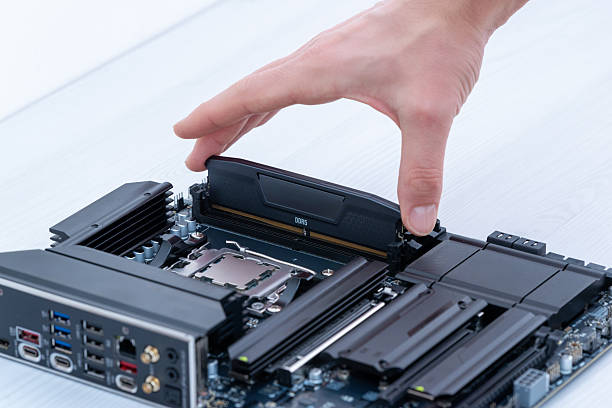
Following the recommended memory slot population order helps maintain proper memory channel operation and ensures the server can achieve optimal bandwidth. Incorrect installation patterns may reduce performance or prevent the system from recognizing all installed memory.
Maintaining Balanced Memory Configuration
A balanced memory configuration improves server efficiency by allowing memory channels to operate correctly.
Using matching memory modules with similar specifications helps maintain consistent performance. Factors such as capacity, speed, rank, and DIMM type should be considered when adding new memory to an existing server configuration.
Testing Performance After RAM Expansion
After completing a memory upgrade, testing server performance helps confirm that the installation was successful.
Administrators should verify that the system recognizes the new memory capacity and monitor workload performance after expansion. Regular performance monitoring helps identify whether additional optimization is required.
Long-Term Benefits of Enterprise Server Upgrades
Increasing server memory provides benefits beyond immediate performance improvements. A well planned Dell server RAM upgrade supports future growth, improves infrastructure efficiency, and helps organizations maximize their existing hardware investments.
Extending Server Hardware Lifespan
Additional memory capacity can extend the useful lifespan of Dell PowerEdge servers by allowing them to support newer and more demanding workloads.
Instead of replacing hardware prematurely, organizations can improve existing infrastructure performance through targeted upgrades. This approach helps maintain reliable operations while making better use of current server resources.
Supporting Growing Business Applications
Business applications continue to require more computing resources as data volumes and operational requirements increase.
A memory upgrade provides additional capacity for applications that require greater processing resources. This allows businesses to support changing requirements while maintaining consistent system performance.
Organizations looking to understand broader approaches to selecting suitable hardware resources can also explore these computer memory solutions for additional guidance on memory planning and optimization.
Improving Infrastructure Efficiency and Reliability
Efficient infrastructure management helps businesses reduce performance limitations and improve operational reliability.
Additional RAM allows servers to handle workloads more effectively, improves resource distribution, and reduces unnecessary strain on existing hardware components.
Why Choose RAM Exchange for Dell Server RAM Upgrades
Selecting the right memory provider is an important part of a successful server upgrade. Enterprise environments require reliable memory solutions that meet compatibility requirements and support demanding workloads.
Working with an experienced supplier simplifies the selection process and helps organizations identify suitable memory configurations for their Dell PowerEdge systems.
Access to Compatible Dell Server Memory Solutions
RAM Exchange provides compatible memory solutions designed for enterprise server environments, including Dell PowerEdge systems.
Their memory options support different server generations and workload requirements, helping businesses find suitable upgrades based on their infrastructure needs.
Reliable Memory Options for Enterprise Environments
Enterprise servers require memory modules that provide consistent performance and reliability.
RAM Exchange focuses on providing dependable memory options that meet business requirements while helping organizations maintain stable server operations.
Expert Support for PowerEdge Memory Expansion
Choosing the correct server memory can involve several technical considerations, including DIMM compatibility, capacity limitations, and performance requirements.
Expert support helps businesses select appropriate memory configurations while reducing the risk of incorrect purchases or installation challenges.
Conclusion
A Dell server RAM upgrade is an effective way to improve virtualization performance, increase application responsiveness, and support growing business workloads. As organizations continue to depend on powerful server infrastructure, having sufficient memory capacity becomes essential for maintaining efficient operations.
Understanding memory requirements, checking PowerEdge compatibility, and following proper installation practices helps ensure a successful upgrade. The right memory configuration allows businesses to improve resource utilization, extend hardware lifespan, and create a more scalable infrastructure.
For assistance selecting compatible memory solutions for your Dell PowerEdge server, you can contact RAM Exchange for expert guidance and enterprise memory support.
FAQs
1. Why should I upgrade the RAM in my Dell PowerEdge server?
Upgrading RAM improves server performance by increasing available resources for applications, virtualization environments, and business workloads. Additional memory helps reduce performance limitations and supports future scalability.
2. How do I know if my Dell server needs more RAM?
Common signs include slow application performance, high memory utilization, reduced virtualization capacity, and difficulty supporting additional workloads. Monitoring server memory usage can help identify upgrade requirements.
3. Can I install any RAM module in a Dell PowerEdge server?
No. Dell PowerEdge servers support specific memory types, speeds, capacities, and configurations. It is important to select compatible server memory that matches the system specifications.
4. Does more RAM improve virtualization performance?
Yes. Additional RAM allows virtual machines to access more resources, improves workload distribution, and helps maintain better stability in virtualized environments.
5. What factors should I consider before upgrading Dell server memory?
Important factors include server model, supported memory type, ECC requirements, RAM capacity, speed, DIMM configuration, and future expansion needs.