Effective memory capacity planning is essential for maintaining reliable server performance and supporting growing business workloads. HP servers power many enterprise environments where applications, databases, virtualization platforms, and business systems require consistent access to memory resources. Selecting the right amount of RAM helps organizations avoid performance limitations while maximizing infrastructure investments. By evaluating workload requirements and future growth plans, businesses can determine the appropriate HP server memory capacity needed to maintain efficient and scalable operations.
Why Is HP Server Memory Capacity Planning Important for Businesses?
Memory capacity planning helps businesses ensure their servers have enough resources to support current operations and future expansion. Without proper planning, organizations may experience slow application performance, inefficient resource usage, and unexpected upgrade requirements. A strategic approach allows IT teams to balance performance needs with infrastructure costs while maintaining reliable server operations.
Understanding the Impact of RAM on Server Performance
RAM directly affects how efficiently HP servers process workloads. When servers have sufficient memory, applications can access required data quickly, reducing delays and improving responsiveness. Limited memory capacity forces systems to rely more heavily on storage resources, which can create performance bottlenecks and reduce overall efficiency.
Avoiding Underutilization and Costly Infrastructure Upgrades
Incorrect memory planning can lead to either excessive investment in unused resources or insufficient capacity that requires frequent upgrades. By analyzing workload demands and future requirements, businesses can avoid unnecessary expenses while ensuring servers have the resources needed for consistent performance.
What Is HP Server Memory?
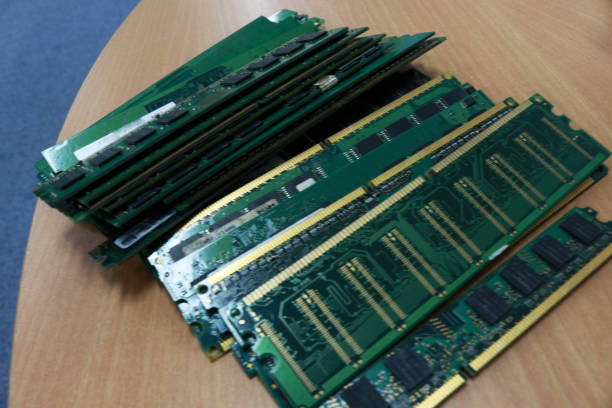
HP server memory refers to enterprise-grade RAM designed specifically for HP server platforms. These memory modules are built to support demanding business workloads while providing reliability, compatibility, and long-term performance. Choosing the correct memory configuration helps organizations improve server efficiency and maintain stable operations.
Understanding HP Server RAM Requirements
HP server RAM requirements depend on multiple factors, including applications, databases, virtualization environments, and the number of users accessing systems. Each workload requires different levels of memory capacity, making proper assessment essential before selecting RAM upgrades.
The Role of Enterprise Server Memory in Business Operations
Enterprise server memory supports critical business processes by enabling faster data access and efficient workload execution. Reliable memory infrastructure allows servers to manage multiple applications simultaneously while maintaining consistent performance across enterprise environments.
How Much RAM Does an Enterprise Server Really Need?
Determining the correct RAM capacity requires more than selecting the highest available option. Businesses need to evaluate their workloads, performance expectations, and future growth plans before deciding on memory requirements. A balanced approach ensures servers deliver optimal performance without unnecessary resource allocation.
Evaluating Workloads Before Selecting Memory Capacity
Workload analysis is the foundation of effective memory planning. IT teams should review application requirements, database usage, virtualization needs, and overall server activity before choosing memory capacity. Understanding how resources are consumed helps organizations select configurations that match operational demands.
Balancing Current Requirements With Future Growth
Enterprise infrastructure must support both present workloads and future expansion. Selecting memory capacity with scalability in mind helps businesses avoid frequent upgrades as applications grow and technology requirements change.
What Factors Affect HP Server Memory Requirements?
Several factors influence how much memory an HP server requires. Understanding these elements allows organizations to create accurate capacity plans that improve efficiency and support long-term infrastructure stability.
Application and Database Workloads
Applications and databases often require significant memory resources because they process and store frequently accessed information. Larger workloads typically require additional RAM capacity to maintain performance and reduce processing delays.
Virtualization and Cloud Infrastructure Demands
Virtualized environments increase memory requirements because multiple virtual machines share physical server resources. Adequate memory allows virtual machines to operate efficiently while reducing competition for available resources.
Number of Users and Concurrent Processes
The number of users accessing applications and the amount of simultaneous processing directly affects memory usage. Servers supporting multiple users and concurrent tasks require sufficient RAM capacity to maintain consistent performance.
How Does Memory Capacity Impact Server Performance?
Memory capacity has a direct relationship with server efficiency and application responsiveness. Properly configured RAM allows HP servers to handle workloads smoothly while reducing delays caused by limited resources. Businesses that prioritize memory planning can improve reliability and maintain stronger operational performance.
Improving Application Response Times
Adequate memory enables applications to access active data faster, reducing processing delays. Improved response times enhance productivity and help ensure business systems operate efficiently.
Reducing Performance Bottlenecks and System Delays
Insufficient memory can create bottlenecks that slow down server operations. Increasing memory capacity helps reduce resource limitations and allows workloads to run more effectively.
Supporting Reliable Business Operations
Reliable memory infrastructure helps maintain consistent server availability by ensuring systems have enough resources to support daily operations. Proper capacity planning contributes to stable and predictable performance.
How Should IT Teams Approach Enterprise Memory Capacity Planning?
Effective enterprise memory capacity planning requires a structured approach that considers current usage, future requirements, and infrastructure scalability. IT teams should regularly evaluate memory performance to ensure servers continue supporting business operations efficiently. A proactive strategy helps organizations identify resource limitations early, optimize existing hardware investments, and plan upgrades that align with long-term technology goals.
Assessing Current Server Usage and Memory Utilization
Before upgrading HP server memory, IT teams should review current memory utilization patterns across servers. Monitoring resource consumption helps identify whether existing RAM capacity is sufficient or if additional memory is required. Understanding peak usage periods, application demands, and workload behavior allows businesses to make informed upgrade decisions.
Forecasting Future Business and Technology Needs
Memory planning should consider expected business growth, application expansion, virtualization requirements, and emerging technology demands. Forecasting future requirements helps organizations avoid short-term solutions that may become insufficient as workloads increase. A forward-looking approach ensures server infrastructure remains capable of supporting evolving operational needs.
Planning Scalable Memory Upgrades
Scalable memory upgrades allow businesses to expand server capabilities without replacing entire systems. IT teams should select memory configurations that provide flexibility for future expansion while maintaining compatibility with existing HP server platforms. Strategic upgrades improve infrastructure longevity and support continuous business growth.
What Are the Signs That Your HP Server Needs More RAM?
Recognizing memory limitations early helps businesses prevent performance issues and maintain efficient operations. When servers lack sufficient memory, applications may slow down, workloads may experience delays, and virtualization environments may become less efficient. Identifying these warning signs allows organizations to upgrade resources before performance problems affect productivity.
Slow Application Performance and Increased Latency
Applications that take longer to respond may indicate insufficient memory availability. When servers cannot store enough active data in RAM, they rely more heavily on storage resources, increasing processing delays and reducing application efficiency.
High Memory Utilization During Peak Workloads
Consistently high memory usage indicates that server resources may no longer meet workload requirements. Monitoring utilization levels during busy periods helps IT teams determine whether additional RAM capacity is needed.
Reduced Efficiency in Virtualized Environments
Virtualization platforms depend heavily on available memory resources. When multiple virtual machines compete for limited RAM, performance can decline. Increasing memory capacity improves resource allocation and helps maintain stable virtualized operations.
What Should Businesses Consider Before Upgrading HP Server RAM?
Upgrading HP server RAM requires careful evaluation to ensure compatibility, reliability, and performance improvements. Businesses should consider technical specifications, workload requirements, and long-term infrastructure goals before selecting memory modules. A properly planned upgrade helps organizations achieve better performance without creating compatibility issues.
Checking Server Compatibility and Memory Specifications
Before purchasing memory upgrades, businesses should verify HP server specifications, supported memory types, maximum capacity limits, and configuration requirements. Compatible memory ensures stable operation and prevents performance limitations caused by incorrect installations.
Selecting the Right Capacity, Speed, and Configuration
Memory capacity, speed, and configuration all influence server performance. Businesses should select RAM based on application requirements and workload demands rather than choosing memory based only on available capacity. Proper configuration helps servers operate efficiently while supporting future expansion.
Choosing Reliable Enterprise-Grade Memory Modules
Enterprise servers require memory designed for continuous operation and demanding workloads. High-quality memory modules provide improved reliability, compatibility, and long-term performance compared with standard consumer-grade alternatives.
What Common Mistakes Should Businesses Avoid During Memory Upgrades?
Memory upgrades can significantly improve server performance, but poor planning can reduce expected benefits. Businesses should avoid common mistakes that may create compatibility problems, limit scalability, or increase future costs. A thoughtful upgrade strategy ensures memory investments provide long-term value.
Installing More RAM Without Understanding Workloads
Adding memory without analyzing workload requirements may not solve underlying performance issues. Businesses should first understand application demands, virtualization needs, and resource usage before selecting additional RAM.
Using Incompatible or Low-Quality Memory Modules
Incorrect or low-quality memory modules can cause system instability, reduced performance, and operational disruptions. Selecting tested enterprise memory ensures better compatibility and reliable server operation.
Ignoring Long-Term Scalability Requirements
Memory upgrades should support future growth rather than only current requirements. Ignoring scalability can result in repeated upgrades and increased infrastructure costs over time.
How Can RAM Exchange Support HP Server Memory Planning?
Selecting the right memory partner helps businesses implement reliable and efficient server upgrades. RAM Exchange provides enterprise memory solutions designed to support different server platforms, workload requirements, and infrastructure goals. With tested products and technical expertise, organizations can improve server performance while maintaining long-term reliability.
Providing Tested HP Server RAM and Enterprise Memory Solutions
RAM Exchange offers tested enterprise memory solutions designed for performance, compatibility, and stability. Businesses can access reliable memory products that support demanding workloads while improving overall server efficiency.
Helping Businesses Optimize Memory Configurations
Proper memory configuration is essential for achieving maximum server performance. RAM Exchange helps organizations evaluate memory requirements and select suitable solutions based on infrastructure needs. Businesses can also explore Ram Exchange for enterprise memory options and technical support.
Supporting Current and Legacy HP Server Platforms
Many organizations continue using different generations of HP server hardware. RAM Exchange supports both current and legacy platforms by providing compatible memory solutions that help extend infrastructure lifespan and improve operational efficiency.
Conclusion
Proper HP server memory capacity planning helps businesses maintain reliable performance, improve application efficiency, and support future infrastructure growth. By understanding workload requirements, monitoring memory usage, and selecting compatible enterprise-grade modules, organizations can avoid bottlenecks and maximize server investments.
A strategic memory upgrade approach improves scalability while reducing unnecessary hardware replacement costs. Businesses looking to optimize their hardware lifecycle can explore sell computer memory solutions and trusted enterprise memory services to support efficient infrastructure management.
Upgrade Your HP Memory with RAM Exchange Contact for expert guidance on reliable server memory solutions.
Frequently Asked Questions About HP Server Memory
How Do I Calculate the Right RAM Capacity for an HP Server?
The right RAM capacity depends on application requirements, database workloads, virtualization needs, number of users, and future growth expectations. Businesses should analyze current usage patterns and projected workload increases before selecting memory capacity.
Can Adding More RAM Improve Server Performance?
Yes, adding more RAM can improve server performance when existing memory capacity is limiting workload efficiency. Additional memory allows applications to access data faster and reduces reliance on slower storage resources.
How Often Should Businesses Review Server Memory Requirements?
Businesses should review memory requirements regularly, especially when workloads increase, new applications are introduced, or virtualization environments expand. Continuous monitoring helps maintain optimal server performance.
What Happens If an HP Server Does Not Have Enough RAM?
Insufficient RAM can cause slower applications, increased latency, reduced virtualization efficiency, and overall performance issues. Upgrading memory helps restore performance and improve workload stability.
Is Enterprise Server Memory Better Than Standard RAM?
Yes, enterprise server memory is designed for reliability, compatibility, and continuous operation. It provides the stability required for business-critical workloads and demanding server environments.