
Enterprise IT environments depend on fast, reliable infrastructure to support applications, virtualization platforms, databases, and cloud services. As workloads become increasingly demanding, memory plays a critical role in maintaining consistent system performance. When servers lack sufficient or properly configured memory, organizations often experience slower processing, increased latency, and reduced productivity. Investing in reliable computer memory solutions helps businesses eliminate performance bottlenecks, improve workload efficiency, and extend the lifespan of enterprise infrastructure. By deploying enterprise-grade memory, organizations can optimize existing hardware while preparing for future growth.
Why Do Memory Bottlenecks Affect Enterprise IT Performance?
Memory bottlenecks occur when servers cannot supply applications and processors with enough active data to maintain efficient performance. As enterprise environments continue expanding, workloads demand greater memory capacity and faster data access. Without adequate memory resources, servers rely more heavily on storage systems, increasing latency and reducing overall operational efficiency.
Understanding How Insufficient Memory Impacts Workloads
When available memory becomes limited, enterprise applications compete for resources, resulting in slower response times and decreased processing efficiency. Virtual machines, databases, analytics platforms, and cloud workloads all require sufficient RAM to perform consistently. Inadequate memory forces systems to access storage more frequently, creating delays that affect business operations.
The Relationship Between Memory Performance and Business Productivity
Memory performance directly influences how quickly enterprise applications process information. Faster memory access improves application responsiveness, supports efficient multitasking, and allows employees and business systems to complete tasks without unnecessary delays. Optimized memory infrastructure contributes to higher productivity while supporting reliable day-to-day operations.
What Are Computer Memory Solutions?
Computer memory solutions consist of enterprise-grade memory products designed to improve server performance, stability, and scalability. Unlike consumer memory, enterprise memory is engineered for continuous operation under demanding workloads. These solutions enable organizations to maximize existing infrastructure while supporting future expansion without unnecessary hardware replacement.
Understanding Enterprise Memory Infrastructure
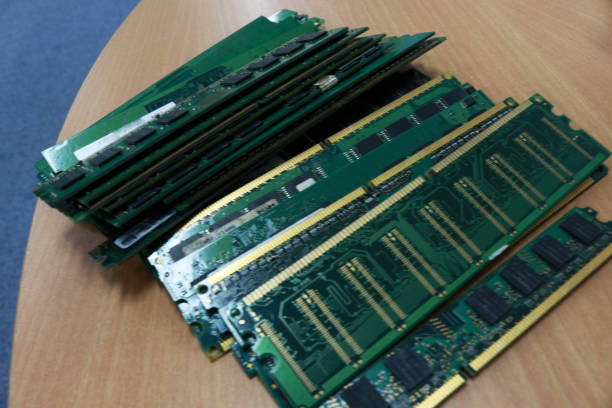
Enterprise memory infrastructure includes high-performance DRAM modules designed for servers, storage systems, and virtualization platforms. Proper memory configurations ensure processors receive rapid access to active data, improving workload efficiency while maintaining consistent application performance across enterprise environments.
How Memory Upgrades Improve System Performance
Upgrading enterprise memory is one of the most effective ways to improve server performance without replacing existing hardware. Additional memory allows servers to support more virtual machines, larger databases, and higher application workloads while reducing reliance on slower storage resources. Organizations deploying certified Cisco UCS server memory benefit from improved platform compatibility, stable performance, and reliable scalability across enterprise environments.
What Causes Performance Bottlenecks in Enterprise IT Environments?
Performance bottlenecks rarely result from a single component. Instead, they often develop when memory capacity, hardware compatibility, or server configurations no longer align with growing business requirements. Identifying these issues early helps organizations maintain reliable infrastructure while avoiding unnecessary downtime.
Insufficient RAM Capacity
As enterprise workloads expand, available memory may no longer support increasing application demands. Limited RAM reduces processing efficiency and forces systems to depend on storage resources, resulting in slower application performance and increased latency throughout the infrastructure.
Outdated or Incompatible Memory Modules
Older memory technologies or incompatible memory configurations may prevent servers from operating at their full potential. Using certified, compatible enterprise memory helps maintain stable performance while ensuring servers operate according to manufacturer specifications.
Poorly Optimized Server Configurations
Even servers equipped with adequate memory may experience reduced performance if memory configurations are not properly optimized. Balanced memory allocation across processors improves resource utilization while allowing enterprise workloads to execute more efficiently.
How Do Computer Memory Solutions Improve Workload Performance?
Enterprise memory solutions improve overall infrastructure efficiency by providing faster access to active data and supporting demanding business applications. Well-designed memory configurations reduce processing delays while enabling servers to handle increasing workloads without compromising stability or responsiveness.
Accelerating Virtual Machines and Business Applications
Virtualization environments require significant memory resources because multiple operating systems and applications share physical hardware. Additional enterprise memory allows virtual machines to perform efficiently while reducing contention for available resources. Business applications also benefit from faster processing and improved response times.
Supporting Data-Intensive Enterprise Workloads
Modern organizations rely on databases, analytics platforms, cloud computing, and business intelligence applications that continuously process large volumes of information. Enterprise memory provides these workloads with the resources necessary to maintain consistent performance, helping organizations improve operational efficiency while supporting business growth.
Reducing System Latency and Processing Delays
Sufficient memory allows processors to access frequently used information directly from RAM rather than repeatedly retrieving data from storage devices. This reduces latency, accelerates processing, and improves overall system responsiveness during demanding workloads.
Why Is Enterprise RAM Optimization Essential?
Installing additional memory alone does not guarantee maximum performance. Enterprise RAM optimization ensures memory resources are configured efficiently to support application workloads, virtualization environments, and future business growth. Proper optimization improves infrastructure stability while maximizing return on existing hardware investments.
Maximizing Existing Server Resources
Optimized memory configurations allow servers to utilize processors more effectively by ensuring adequate resources remain available for active workloads. Organizations can often increase infrastructure capacity through memory optimization instead of investing in complete hardware replacements.
Improving Application Responsiveness
Applications with sufficient memory respond faster because processors spend less time retrieving information from slower storage devices. Improved responsiveness supports higher productivity while maintaining reliable performance across business-critical systems.
Supporting Scalable Business Growth
Scalable memory infrastructure enables organizations to accommodate increasing workloads without major disruptions. Strategic memory upgrades help businesses prepare for virtualization expansion, cloud adoption, and future enterprise technology requirements while protecting existing infrastructure investments.
How Does Memory Infrastructure Improve Server Efficiency?
Efficient memory infrastructure allows enterprise servers to process workloads with greater speed and consistency. As organizations increase virtualization, cloud adoption, and data-intensive applications, properly configured memory becomes essential for maintaining high resource utilization. A well-planned memory strategy improves server efficiency, supports business continuity, and helps organizations maximize the value of their existing infrastructure investments.
Increasing Resource Utilization Across Servers
Enterprise memory enables servers to handle more concurrent workloads by providing processors with rapid access to active data. Higher memory capacity allows organizations to improve server utilization without compromising stability or application performance. Efficient resource allocation also helps IT teams reduce unnecessary hardware expansion while maintaining reliable operations.
Enhancing Multi-Tasking and Virtualization Performance
Modern enterprise environments frequently operate multiple virtual machines, databases, and business applications simultaneously. Enterprise-grade memory provides the capacity required to support these workloads without excessive resource contention. Organizations deploying certified HPE memory server solutions can improve compatibility with enterprise hardware while maintaining dependable virtualization performance and long-term infrastructure stability.
Reducing Hardware Bottlenecks Without Full System Replacement
Replacing entire servers is not always necessary to improve infrastructure performance. Memory upgrades provide an effective way to eliminate bottlenecks by increasing available system resources while preserving existing hardware investments. This approach extends server lifespan and improves operational efficiency without significant infrastructure disruption.
What Should IT Teams Consider Before Upgrading Enterprise Memory?
Selecting enterprise memory requires careful planning to ensure compatibility, performance, and long-term scalability. IT teams should evaluate existing infrastructure, anticipated workload growth, and vendor reliability before implementing memory upgrades. A strategic approach minimizes deployment risks while maximizing the value of memory investments.
Compatibility With Existing Server Platforms
Enterprise memory should match supported server specifications, including memory type, speed, capacity, and processor compatibility. Verifying these requirements before deployment helps prevent compatibility issues while ensuring optimal system performance.
Capacity Planning for Future Growth
Memory planning should account for future virtualization expansion, cloud adoption, database growth, and evolving business applications. Investing in scalable memory today reduces the need for frequent infrastructure upgrades while supporting long-term operational objectives.
Balancing Performance, Reliability, and Cost
Although budget considerations remain important, enterprise organizations should prioritize certified memory that delivers consistent performance and proven reliability. High-quality memory reduces operational risks while providing greater long-term value through improved system stability.
What Common Memory Upgrade Mistakes Should Businesses Avoid?
Memory upgrades can significantly improve server performance, but poor planning may limit expected benefits. Understanding common upgrade mistakes allows organizations to deploy memory solutions that support long-term infrastructure reliability and business growth.
Installing Incompatible Memory Modules
Using unsupported memory types, speeds, or capacities may reduce server performance or create system instability. Standardizing enterprise memory configurations simplifies maintenance while improving compatibility across the infrastructure.
Underestimating Future Workload Requirements
Planning upgrades solely around current workloads often results in insufficient capacity as business demands increase. Evaluating future application growth helps organizations implement memory solutions that remain effective for years to come.
Choosing Price Over Enterprise-Grade Reliability
Lower-cost memory may appear attractive initially, but it often lacks the reliability and compatibility required for enterprise environments. Certified enterprise memory helps reduce downtime, maintenance costs, and long-term operational risks.
How Can Computer Memory Solutions Support Long-Term Operational Efficiency?
Long-term operational efficiency depends on infrastructure that remains reliable, scalable, and cost effective throughout its lifecycle. Enterprise memory contributes to these goals by improving server performance, reducing maintenance requirements, and extending the useful life of existing hardware.
Extending the Life of Existing Infrastructure
Memory upgrades allow organizations to increase server performance without replacing functioning hardware. Extending infrastructure lifespan maximizes previous technology investments while delaying major capital expenditures.
Reducing Downtime and Maintenance Requirements
Reliable enterprise memory minimizes hardware-related disruptions and supports continuous server operation. Stable infrastructure reduces maintenance frequency while helping IT teams maintain consistent service availability.
Improving Total Cost of Ownership
Strategic memory investments improve overall infrastructure efficiency while reducing upgrade frequency, maintenance expenses, and operational disruptions. Better resource utilization also enables organizations to achieve greater value from existing server platforms.
Why Choose RAM Exchange for Computer Memory Solutions?
Selecting the right enterprise memory provider is essential for achieving reliable infrastructure performance. RAM Exchange combines extensive industry experience with certified products and technical expertise to help organizations implement memory solutions that meet current and future business requirements.
Trusted Enterprise Memory Supplier Since 2006
Since 2006, RAM Exchange has supported organizations with enterprise memory products designed for business-critical environments. Its experience enables customers to source dependable solutions for both current and legacy server platforms.
Certified and Fully Tested Memory for Current and Legacy Systems
RAM Exchange supplies certified memory that undergoes extensive testing to ensure compatibility, stability, and consistent performance across a wide range of enterprise hardware.
Expert Guidance, Global Sourcing, and Custom Memory Solutions
Every IT environment has unique requirements. RAM Exchange provides expert guidance, global sourcing capabilities, and customized memory solutions that help organizations deploy reliable infrastructure while simplifying future upgrades.
Conclusion
Enterprise memory plays a critical role in eliminating performance bottlenecks, improving workload efficiency, and supporting scalable IT infrastructure. Organizations that invest in certified computer memory solutions benefit from faster application performance, improved virtualization, greater server efficiency, and stronger long-term operational reliability. By implementing the right memory strategy, businesses can maximize existing infrastructure while preparing confidently for future technology demands.
Contact Our Experts by visiting Contact us page to find the right enterprise memory solution for your business.
Frequently Asked Questions About Computer Memory Solutions
How Do I Know if My Servers Need More Memory?
Servers may require additional memory if applications become slower, virtualization density increases, memory utilization remains consistently high, or workloads regularly exceed available resources.
Can a Memory Upgrade Improve Server Performance Without Replacing Hardware?
Yes. Memory upgrades often improve application responsiveness, virtualization performance, and overall server efficiency without requiring complete hardware replacement.
What Should Businesses Consider When Selecting Enterprise Memory?
Businesses should evaluate compatibility, capacity, workload requirements, reliability, certification, and future scalability before selecting enterprise memory solutions.
How Does Enterprise Memory Improve Virtualization Performance?
Additional enterprise memory provides virtual machines with greater resources, reducing contention and improving workload stability across virtualized environments.
Why Is Certified Enterprise Memory Recommended?
Certified enterprise memory is thoroughly tested for compatibility and long-term reliability, making it suitable for continuous operation in demanding enterprise IT environments.